


Patient Medication Information: uses, side effects, how to take - Lyumjev
What is Lyumjev used for?
Serious Warnings and Precautions
|
- The treatment of adults with diabetes mellitus who require insulin for the control of high blood sugar.
- The treatment of people with type 2 diabetes, generally used in combination with an intermediate- or long-acting insulin for the control of high blood sugar.
How does Lyumjev work?
Lyumjev is a fast-acting insulin lispro formulation used to treat diabetes. Lyumjev will start to lower your blood sugar within 20 minutes after starting a meal. Due to this short action Lyumjev should normally be taken in combination with intermediate- or long-acting insulin preparation.
What are the ingredients in Lyumjev?
Medicinal ingredients: insulin lispro.
Non-medicinal ingredients: glycerol, magnesium chloride hexahydrate, metacresol, sodium citrate dihydrate, treprostinil sodium, Water for Injection and zinc oxide. Hydrochloric acid and/or sodium hydroxide may be added to adjust pH.
Lyumjev comes in the following dosage forms:
Solution for injection, 100 units/mL (each mL contains 100 units of insulin lispro):
- Vial; pack size: 1 vial of 10 mL
- Cartridge; pack size: 5 cartridges of 3 mL
- KwikPen® (pre-filled pen); pack size: 5 pre-filled pens of 3 mL
- Junior KwikPen® (pre-filled pen); pack size: 5 pre-filled pens of 3 mL
- Tempo Pen™ (pre-filled pen); pack size: 5 pre-filled pens of 3 mL
Solution for injection, 200 units/mL (each mL contains 200 units of insulin lispro):
- KwikPen® (pre-filled pen); pack sizes: 2 pre-filled pens of 3 mL and 5 pre-filled pens of 3 mL
Not all pack sizes and presentations may be available.
Lyumjev is a water-clear, colourless and aqueous solution for injection.
Lyumjev 10 mL vial can be used with a syringe or for filling a pump reservoir in a continuous infusion pump system.
Lyumjev cartridges are designed for use with Lilly’s reusable insulin pens. Patients need to check their device manual to determine if the Lyumjev cartridge is compatible for use in other devices.
Do not use Lyumjev if:
- Your blood sugar is too low (hypoglycemia).
- You are allergic to anything in Lyumjev. (See What are the ingredients in Lyumjev?)
To help avoid side effects and ensure proper use, talk to your healthcare professional before you take Lyumjev. Talk about any health conditions or problems you may have, including if you:
- Are experiencing stress, are ill, or have infections. These may affect your insulin needs.
- Take a class of oral antidiabetic drugs called thiazolidinediones (TZDs). Taking TZDs with insulin may increase risk of swelling and heart failure.
Have trouble with your adrenal, pituitary or thyroid glands. Your healthcare provider may
- decide to alter your insulin dose.
- Suffer from diarrhea, vomiting or eat less then usual. You may need less insulin than usual.
- Exercise more than usual or if you want to change your usual diet.
- Have kidney or liver problems. You may need to check your blood sugar level more often and talk to your healthcare provider about changes in your dose.
Are pregnant or planning a pregnancy or are breastfeeding.
- Are planning to travel over time zones. Travelling over time zones may affect your insulin needs and the timing of your injections.
Other warnings you should know about:
Do not share your Lyumjev with other people, even if the needle is changed. You may give other people a serious infection or get a serious infection from them.
Know the type and strength of insulin you take. Do not change the type or amount of insulin you take unless your healthcare provider tells you to. The amount of insulin and the best time for you to take your insulin may need to change if you take different types of insulin.
Hypokalemia (low potassium) is a possible side effect with all insulins. You might be more at risk if you are on potassium lowering drugs or losing potassium (e.g. diarrhea).
Swelling around your joints – When you first start using your medicine, your body may keep more water than it should. This causes swelling around your ankles and other joints. This is usually only short-lasting.
Low blood sugar (hypoglycemia) may occur earlier after an injection/infusion of Lyumjev compared to other mealtime insulins due to the earlier onset of action of Lyumjev.
Eye disorder - Fast improvements in blood sugar control may lead to a temporary worsening of diabetic eye disorder.
Never drive or use machinery if you feel a low blood sugar (hypoglycemic) reaction coming on. Your ability to concentrate or to react will be less during a hypoglycemic reaction. Please keep this in mind in all situations where you might put yourself and others at risk (e.g. driving a car or operating machinery).
High Blood Sugar (Hyperglycemia) and Ketoacidosis
You have hyperglycemia if your blood sugar gets too high.
This might happen:
- If you forget to take or stop taking insulin.
- If you keep taking less insulin than you need.
- If you eat more than usual.
- If you exercise less than usual.
If you drink alcohol.
- If you get an infection or fever.
The warning signs appear gradually. They include: increased urination, feeling thirsty, losing your appetite, feeling sick (nausea or vomiting), feeling drowsy or tired, flushed dry skin, a dry mouth and a fruity (acetone) smelling breath.
These may be signs of a very serious condition called diabetic ketoacidosis (a condition with too much acid in the blood). If you don't treat it, this could lead to diabetic coma and death.
What to do if you get any of these signs: test your blood sugar level, test your urine for ketones if you can, then seek medical advice right away.
Tell your healthcare professional about all the medicines you take, including any drugs, vitamins, minerals, natural supplements or alternative medicines.
The following may interact with Lyumjev:
Insulin requirements may be reduced if you take any of the medicines below:
- Other medicines for the treatment of diabetes
- Medicines used to treat high blood pressure and/or heart problems, such as: angiotensin converting enzyme (ACE) inhibitors, angiotensin receptor blocking (ARB) agents, disopyramide
- Fibrates (medicine used for lowering high levels of blood fats)
- Monoamine oxidase inhibitors (MAOI) (medicines used to treat depression)
- Medicines used to relieve pain and lower fever, such as pentoxifylline, propoxyphene and salicylates
- Sulfonamide antibiotics (medicines used to treat infections)
- Somatostatin analogs, such as octreotide
- Fluoxetine
Insulin requirements may be increased if you take any of the medicines below:
- Atypical antipsychotics (e.g. olanzapine and clozapine)
- Hormones, such as: estrogens and/or progesterone (alone or as contraceptive pills), growth hormone, thyroid hormones, glucagon
- Corticosteroids (used to treat inflammation)
- Danazol (medicine acting on ovulation)
- Protease inhibitors (used to treat HIV infection)
- Diuretics (also called water pills), used to treat high blood pressure or fluid retention
- Isoniazid (used to treat tuberculosis)
- Some medicines used to treat asthma, such as albuterol, epinephrine, terbutaline
- Niacin and phenothiazines
Insulin requirements may increase or decrease if you take any of the medicines below:
- High blood pressure medicines, such as: beta-blockers or clonidine
- Some medicines used to treat mental health problems, such as: lithium salts
- Alcohol (including wine and beer)
- A medicine used to treat some parasitic infections, called pentamidine. This may cause too low blood sugar which is sometimes followed by too high blood sugar.
Some medicines may make it harder to recognize the warning signs of your blood sugar being too low (hypoglycemia). Such medicines include: beta-blockers medicines, clonidine, guanethidine, or reserpine.
How to take Lyumjev:
Check your insulin label each time you give your injection to make sure you are using the correct insulin.
Inspect Lyumjev visually before use. Only use Lyumjev if the solution appears clear and colourless. Do not use Lyumjev if it is thick, cloudy, or coloured, or if you see lumps or particles in it.
Do not use Lyumjev past the expiration date printed on the label or 28 days after you first start using a new vial, cartridge or KwikPen.
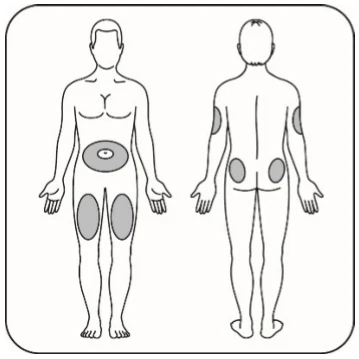
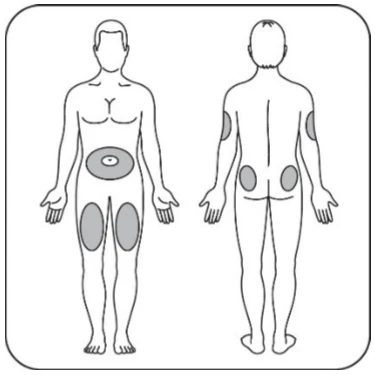
Lyumjev 100 units/mL and Lyumjev 200 units/mL can be injected under the skin (subcutaneous) of your stomach area, buttock, upper legs, or upper arms.
Lyumjev 100 units/mL is also for use in continuous infusion pumps.
Lyumjev 100 units/mL may also be given in your vein (intravenously) by your healthcare provider.
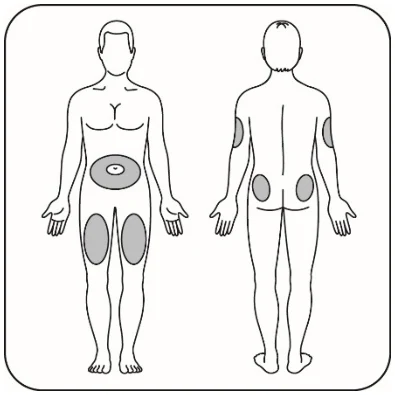
Change (rotate) your injection sites within the area you choose with each dose to reduce your risk of getting pits in your skin or thickened skin (lipodystrophy) and skin with lumps (localized cutaneous amyloidosis) at the injection sites.
- Do not use the exact same spot for each injection.
- Do not inject where the skin has pits, is thickened, or has lumps.
- Do not inject where the skin is tender, bruised, scaly or hard, or into scars or damaged skin.
Check your blood sugar levels. Ask your healthcare provider what your blood sugars should be and when you should check your blood sugar level.
Lyumjev starts acting fast. Inject Lyumjev at the beginning of a meal or within 20 minutes after you start eating a meal. A maximum effect occurs between 1 and 3 hours after injection. The duration of action of Lyumjev is between 3 and 5 hours.
How to inject Lyumjev 100 units/mL using a vial
- Use a syringe marked for U100 insulin.
- Wash your hands with soap and water.
- Check the Lyumjev label to make sure you are taking the right type of insulin. This is especially important if you use more than 1 type of insulin.
- Always use a new syringe and needle for each injection to prevent infections and blocked needles.
- If you are using a new vial, pull off the plastic protective cap, but do not remove the rubber stopper.
- Wipe the rubber stopper with an alcohol swab.
- Remove the cover from the needle. Draw air into the syringe equal to the amount of your insulin dose.
- Put the needle through the rubber stopper of the Lyumjev vial and inject the air into the vial.
- Turn the vial and syringe upside down and slowly pull the plunger down until the plunger tip is a few units past the line for your dose.
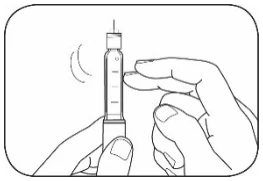
- If there are air bubbles, tap the syringe gently a few times to let any air bubbles rise to the top.
Slowly push the plunger up until the plunger tip reaches the line for your prescribed dose.
- Check the syringe to make sure that you have the right dose.
- Pull the syringe out of the rubber stopper of the vial.
- Inject the insulin under the skin. Use the injection technique advised by healthcare provider. Push the plunger in as far as it will go.
- Pull the needle out and apply gentle pressure over the injection site for several seconds. Do not rub the area.
- Discard needle and disposable plastic syringe after each injection, in a closable, puncture resistant sharps container.
How to use Lyumjev 100 units/mL in an insulin infusion pump system
Follow the instructions from the pump manufacturer and recommendations from your healthcare provider regarding the use of Lyumjev in a pump. Before using Lyumjev in the pump system, you must have received a comprehensive instruction in the use and information about any actions to be taken in case of illness, too high or too low blood sugar or failure of the pump system. Your healthcare provider should provide recommendations for appropriate pump basal rates and bolus settings.
Filling the pump using a Lyumjev vial:
- Lyumjev should never be diluted or mixed with any other insulin.
- Before inserting the needle, use soap and water to clean your hands and the skin where the needle is inserted to avoid any infection at the infusion site.
- When you fill a new reservoir, do not leave large air bubbles in either the syringe or the tubing.
- Changing of the infusion set (tubing and needle) must be done according to the instructions in the product information supplied with the infusion set.
To get the benefit of insulin infusion, and to detect possible malfunction of the insulin infusion pump, it is recommended that you measure your blood sugar level regularly.
What to do if the pump system fails
You should always have an alternative delivery method for your insulin available for injection under the skin (for example, needles and syringes) in case the pump system fails.
How to use a Lyumjev 100 units/mL cartridge
Lyumjev cartridges are for use in reusable insulin pen injectors. Follow the Instructions for Use that comes with the pen injector. Do not use Lyumjev cartridges if they are cracked or broken.
How to use a prefilled Lyumjev KwikPen or a prefilled Lyumjev Tempo Pen
Lyumjev KwikPens (100 units/mL or 200 unit/mL) and Lyumjev Tempo Pen (100 units/mL) are prefilled with insulin. Follow the Instructions for Use that comes with the KwikPen or Tempo Pen.
Usual dose:
Your healthcare provider will tell you how much Lyumjev to take and when to take it. Take Lyumjev exactly as your healthcare provider tells you to.
Overdose:
Excess insulin may cause low blood sugar (hypoglycemia)
You get hypoglycemia if your blood sugar gets too low. This might happen if you:
- Take too much insulin.
- Eat too little or miss a meal.
- Exercise more than usual.
The warning signs of hypoglycemia may come on suddenly and can include: cold sweat, cool pale skin, headache, slurred speech, fast heartbeat, feeling sick, feeling very hungry, temporary changes in vision, drowsiness, unusual tiredness and weakness, nervousness or tremor, feeling anxious, feeling confused, and difficulty concentrating.
If severe hypoglycemia is not treated, it can cause brain damage (temporary or permanent) and even death.
If you have hypoglycemia that makes you pass out, or if you frequently get hypoglycemia, talk to your healthcare provider. The amount or timing of your insulin dose, the amount of food you eat or the amount of exercise you do, may need to be adjusted.
Treating hypoglycemia
Mild to moderate hypoglycemia may be treated by eating foods or drinking beverages that contain sugar. Adjustments in drug dosage, meal patterns, or exercise may be needed.
What others need to do in case you pass out:
Tell your relatives, friends and close colleagues that if you pass out (become unconscious), they must turn you on your side and get medical help right away and give you glucagon if available. They must not give you anything to eat or drink as it could choke you.
Using glucagon
You may recover more quickly from unconsciousness by taking glucagon given by someone who knows how to use it. If you are given glucagon you will need to eat glucose or a sugary snack as soon as you are conscious. If you do not respond to glucagon treatment, you will have to be treated in a hospital. Call for medical help right away after being given glucagon. You need to find the reason for your severe hypoglycemia in order to avoid another episode.
If you think you have taken too much Lyumjev, contact your healthcare professional, hospital emergency department or regional poison control centre immediately, even if there are no symptoms.
Causes of low potassium (hypokalemia)
If you take too much insulin, particularly when given intravenously, it might cause hypokalemia (low potassium). Hypokalemia must be corrected appropriately.
Missed dose:
If you miss a dose of Lyumjev, monitor your blood sugar levels to decide if an insulin dose is needed. Continue with your regular dosing schedule at the next meal.
What are possible side effects from using Lyumjev?
These are not all the possible side effects you may experience when taking Lyumjev. If you experience any side effects not listed here, contact your healthcare professional.
The following side effects may be observed while taking Lyumjev:
Very common (more than 1 out of 10 patients)
Low Blood Sugar [See section ‘Excess insulin may cause low blood sugar (hypoglycemia)’]
Common (less than 1 out of 10 patients)
Reaction at administration site
Allergic reactions
Uncommon
Changes under the skin where you give injections (lipodystrophy)
Rash
Itchy skin
Reaction at the administration site
Local reactions at the place you inject/infuse Lyumjev may occur. The signs may include: pain, rash, redness, inflammation, bruising and itching. The reactions usually disappear after a few days.
Allergic reactions
If you have a serious allergic reaction to the insulin or any of the ingredients in Lyumjev, stop using Lyumjev and see a doctor right away. The signs of a serious allergic reaction may include:
- A rash over your whole body
- Trouble breathing
- A fast heartbeat
- Swelling of your face, tongue, or throat
- Sweating
- Feeling faint
Changes under the skin where you give injections (lipodystrophy)
Fatty tissue under the skin may shrink (lipoatrophy) or get thicker (lipohypertrophy). Changing where you inject each time may reduce the risk of developing these skin changes. If you notice these skin changes, tell your healthcare provider. If you keep injecting in the same place, these changes can become more severe and affect the amount of medicine your body gets. Tell your healthcare provider if you notice any skin changes at the injection site. Tell your healthcare provider if you are currently injecting into these affected areas before you start injecting in a different area. A sudden change of site may result in hypoglycemia. Your healthcare provider may tell you to check your blood sugar more closely, and to adjust your insulin or your other antidiabetic medications dose.
Skin reactions:
Signs of skin allergy such as rash and itching may occur.
Serious side effects and what to do about them
| Symptom / effect | Talk to your healthcare professional | Stop taking drug and get immediate medical help | |
| Only if severe | In all cases | ||
VERY COMMON Hypoglycemia | ✓ | ||
COMMON Allergic reaction | ✓ | ||
If you have a troublesome symptom or side effect that is not listed here or becomes bad enough to interfere with your daily activities, talk to your healthcare professional.
Reporting Side Effects
You can report any suspected side effects associated with the use of health products to Health Canada by:
NOTE: Contact your health professional if you need information about how to manage your side effects. The Canada Vigilance Program does not provide medical advice. |
Storage:
Refrigerate unopened Lyumjev vials, pens, and cartridges between 2°C to 8°C until time of use and keep in the original carton to protect from light. Do not freeze or use Lyumjev if it has been frozen. Do not expose to direct heat. Discard opened or unopened Lyumjev vials, pens, and cartridges stored at room temperature below 30°C after 28 days.
Do not use Lyumjev after the expiry date which is stated on the label and carton.
Keep out of reach and sight of children.
When used in an insulin infusion pump system:
Lyumjev 100 units/mL inside of the pump reservoir should be replaced:
- At least every 9 days, or according to the pump user manual, whichever is shorter, or
- After being exposed to temperatures above 37°C
If you use Lyumjev in an insulin pump, change the infusion set and the infusion set insertion site according to the pump manufacturer’s user manual.
If you want more information about Lyumjev:
- Talk to your healthcare professional.
- Find the full product monograph that is prepared for healthcare professionals and includes this Patient Medication Information by visiting the Health Canada website, the manufacturer’s website www.lilly.ca, or by calling 1-888-545-5972.
- Instructions for Use can be found on www.lilly.ca.
The information in this document is current as of the last revision date shown below. For the most current information please visit our website or contact us directly.
Lyumjev, KwikPen and Tempo Pen are trademarks owned by or licensed to Eli Lilly and Company, its subsidiaries or affiliates.
You may need to read this package insert again. Please do not throw it away until you have finished your medicine.
Last Revised September 14, 2021
A4-LUM-0000-CA-PMI-YYYYMMDD
Instructions for Use
LYUMJEVTM KwikPen® (LOOM-jehv)
insulin lispro injection
for subcutaneous use
3 mL pen
100 units/mL


www.lilly.ca
Read the Instructions for Use before you start taking Lyumjev and each time you get another Lyumjev KwikPen (Pen). There may be new information. This information does not take the place of talking to your healthcare provider about your medical condition or your treatment.
The Pen is for single patient use only. Do not share your Lyumjev KwikPen with other people, even if the needle has been changed. Do not reuse or share needles with other people. You may give other people a serious infection or get a serious infection from them.
Lyumjev KwikPen is a disposable prefilled pen containing 300 units of Lyumjev.
- Your healthcare provider will tell you how many units to give as your dose and how to inject your prescribed dose of insulin.
- You can give yourself more than 1 dose from the Pen.
- Each turn of the dose knob dials 1 unit of insulin. You can give from 1 to 60 units in a single injection.
- If your dose is more than 60 units, you will need to give yourself more than 1 injection. Always check the number in the dose window to make sure you dialed the correct dose.
- The plunger only moves a little with each injection, and you may not notice that it moves. The plunger will only reach the end of the cartridge when you have used all 300 units in the Pen.
People who are blind or have vision problems should not use the Pen without help from a person trained to use the Pen.
Lyumjev KwikPen Parts
| Pen Cap | Cartridge Holder | Label | Dose Indicator | |||
| Cap Clip | Rubber Seal | Plunger | Pen Body | Dose Window | Dose Knob |
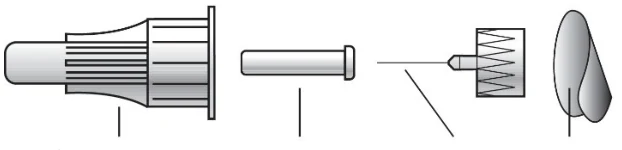
Pen Needle Parts (Needles Not Included) | Dose Knob |
| Outer Needle Shield | |
| Inner Needle Shield | |
| Needle | |
| Paper Tab | |
How to recognize your Lyumjev KwikPen
- Pen colour: Taupe
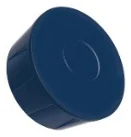
- Dose Knob: Blue, with raised ridges on side
- Label: Blue and white
Supplies needed to give your injection
- Lyumjev KwikPen, [100 units/mL]
- KwikPen compatible needle (BD [Becton, Dickinson and Company] Pen needles recommended)
- Alcohol swab
- Gauze (optional)
Preparing your Pen
- Wash your hands with soap and water.
- Check the Pen to make sure you are taking the right type of insulin. This is especially important if you use more than 1 type of insulin.
- Do not use your Pen past the expiration date printed on the label or for more than 28 days after you first start using the Pen.
- Always use a new needle for each injection to help prevent infections and blocked needles.
 |
 |  |
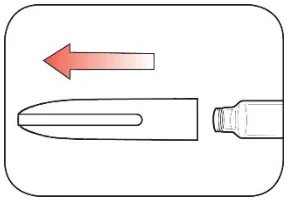
Step 1:
| |
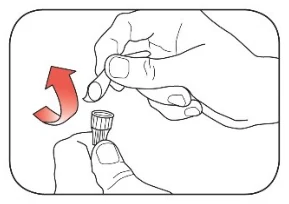
Step 2:
| |
Step 3:
| |
Step 4:
| |
Step 5:
|
Priming your Pen
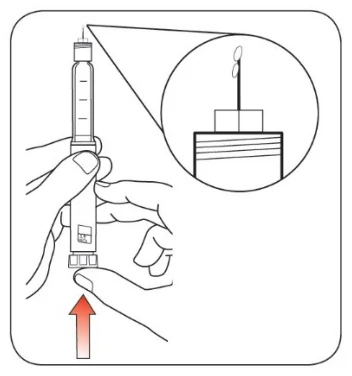
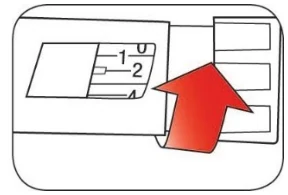
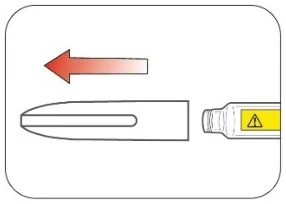
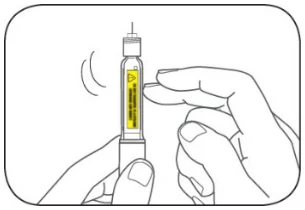
Prime before each injection.
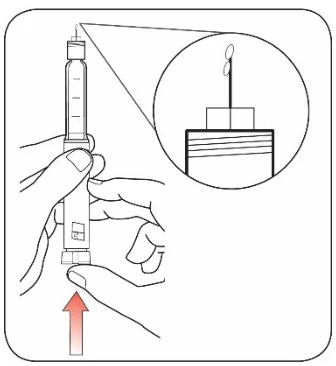
- Priming your Pen means removing the air from the needle and cartridge that may collect during normal use and ensures that your Pen is working correctly.
- If you do not prime before each injection, you may get too much or too little insulin.
Step 6:
|
 | |
 | |
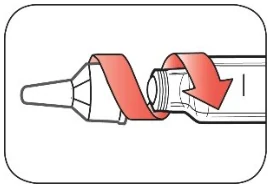 | |
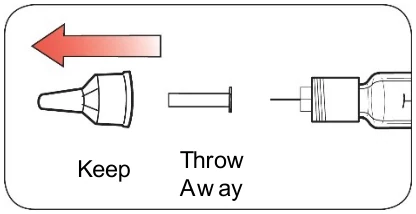 |
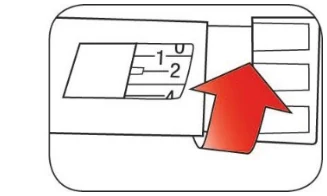 |
Keep Throw Aw ay |
Step 7:
| |
Step 8:
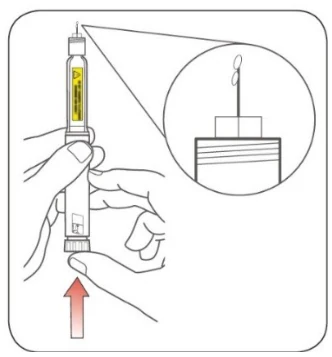
You should see insulin at the tip of the needle.
Small air bubbles are normal and will not affect your dose. |
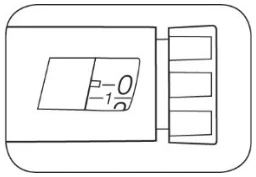
Selecting your dose
- You can give from 1 to 60 units in a single injection.
If your dose is more than 60 units, you will need to give more than 1 injection.
- If you need help with dividing up your dose the right way, ask your healthcare provider.
- Use a new needle for each injection and repeat the priming steps.
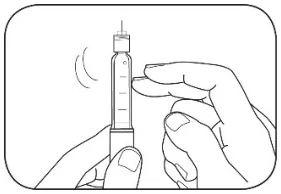 | |
  |
Step 9:
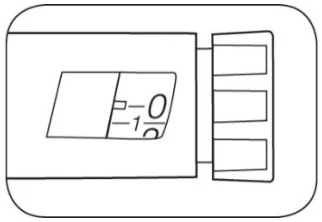
| 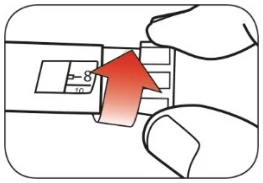 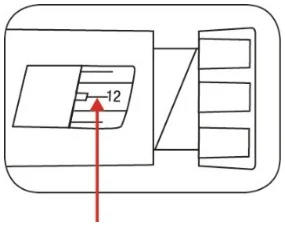 Example: 12 units shown in the dose window 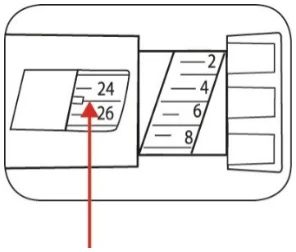 Example: 25 units shown in the dose window |
- The Pen will not let you dial more than the number of units left in the Pen.
If you need to inject more than the number of units left in the Pen, you may either:
- inject the amount left in your Pen and then use a new Pen to give the rest of your dose, or
- get a new Pen and inject the full dose.
- It is normal to see a small amount of insulin left in the Pen that you cannot inject.
Giving your injection
- Inject your insulin as your healthcare provider has shown you.
- Change (rotate) your injection site for each injection.
- Do not try to change your dose while injecting.
Step 10:
| 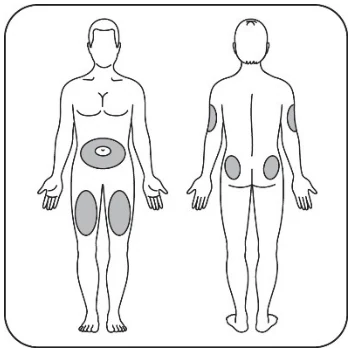 |
Step 11:
| 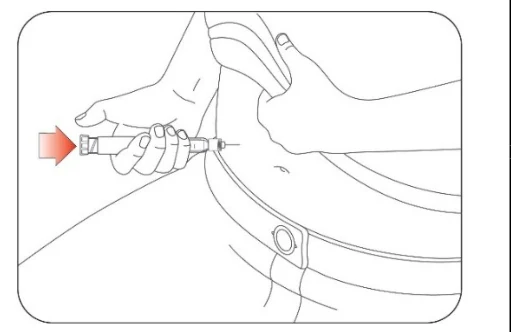 |
Do not try to inject your insulin by turning the dose knob. You will not receive your insulin by turning the dose knob. | 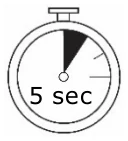 |
5 sec
Step 12:
The plunger only moves a little with each injection, and you may not notice that it moves. If you see blood after you take the needle out of your skin, press the injection site lightly with a piece of gauze or an alcohol swab. Do not rub the area. |
After your injection
Step 13:
| |
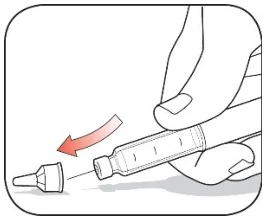
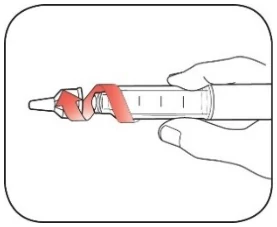
Step 14:
|
 |
 | |
 |
Step 15:
|
Disposing of Pens and needles
- Put used needles in a sharps container or a hard plastic container with a secure lid. Do not throw needles directly into your household trash.
- Dispose of the used Pen as instructed by your healthcare professional after you have removed the needle.
- Do not recycle the filled sharps container.
- Ask your healthcare provider about options to dispose of the sharps container properly. You can also check the Diabetes Canada website at www.diabetes.ca for information on sharps disposal.
- The directions regarding needle handling are not intended to replace local, healthcare provider or institutional policies.
Storing your Pen
Unused Pens
- Store unused Pens in the refrigerator at 2°C to 8°C.
- Do not freeze Lyumjev. Do not use if it has been frozen.
- Unused Pens may be used until the expiration date printed on the label if the Pen has been kept in the refrigerator.
In-use Pen
- Store the Pen you are currently using at room temperature up to 30°C. Keep away from heat and light.
- Throw away the Lyumjev KwikPen you are using after 28 days, even if it still has insulin left in it.
General information about the safe and effective use of your Pen
- Keep your Pen and needles out of the sight and reach of children.
- Do not use your Pen if any part looks broken or damaged.
- Always carry an extra Pen in case yours is lost or damaged.
Troubleshooting
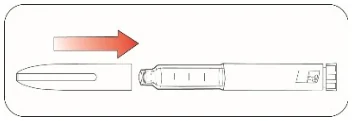
- If you cannot remove the Pen cap, gently twist the cap back and forth, and then pull the cap straight off.
If the dose knob is hard to push:
- pushing the dose knob more slowly will make it easier to inject.
- your needle may be blocked. Put on a new needle and prime the Pen.
- you may have dust, food, or liquid inside the Pen. Throw the Pen away and get a new Pen.
 |
If you have any questions or problems with your Lyumjev KwikPen, contact Lilly at 1-888-545-5972 or call your healthcare provider for help. For more information on Lyumjev KwikPen and insulin, go to www.lilly.ca.
Distributed by:
Eli Lilly Canada Inc.
P.O. Box 73
Toronto, Ontario
M5X 1B1
Manufactured by:
Eli Lilly and Company
Lilly Corporate Center
Indianapolis, IN 46285, USA
LYUMJEVTM and KwikPen® are trademarks owned by or licensed to Eli Lilly and Company, its subsidiaries or affiliates.
Copyright © YYYY, Eli Lilly and Company. All rights reserved.
LYUMJEV KwikPen meets the current dose accuracy and functional requirements of ISO 11608-1.
The information in this document is current as of the revision date shown below. For the most current information please visit our website at www.lilly.ca or contact us directly at 1-888-545-5972.
Document Revision Date: September 14, 2021
A1-LUMKP-CA-IFU-0000-YYYYMMDD
Instructions for Use
LYUMJEVTM Junior KwikPen® (LOOM-jehv)
insulin lispro injection
for subcutaneous use
3 mL pen
100 units/mL


www.lilly.ca
Read the Instructions for Use before you start taking Lyumjev and each time you get another Lyumjev Junior KwikPen (Pen). There may be new information. This information does not take the place of talking to your healthcare provider about your medical condition or your treatment.
The Pen is for single patient use only. Do not share your Lyumjev Junior KwikPen with other people, even if the needle has been changed. Do not reuse or share needles with other people. You may give other people a serious infection or get a serious infection from them.
Lyumjev Junior KwikPen is a disposable prefilled pen containing 300 units of Lyumjev.
- Your healthcare provider will tell you how many units to give as your dose and how to inject your prescribed dose of insulin.
- You can give yourself more than 1 dose from the Pen.
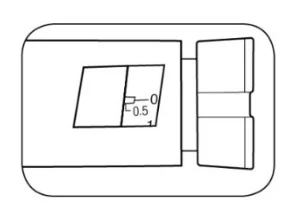
- Each turn of the dose knob dials 0.5 (½) unit of insulin. You can give from 0.5 (½) unit to 30 units in a single injection.
- If your dose is more than 30 units, you will need to give yourself more than 1 injection. Always check the number in the dose window to make sure you dialed the correct dose.
- The plunger only moves a little with each injection, and you may not notice that it moves. The plunger will only reach the end of the cartridge when you have used all 300 units in the Pen.
People who are blind or have vision problems should not use the Pen without help from a person trained to use the Pen.
Lyumjev Junior KwikPen Parts
| Pen Cap | Cartridge Holder | Label | Dose Indicator | ||||||
 | |||||||||
| Cap Clip | Rubber Seal | Plunger | Pen Body | Dose Window | Dose Knob | ||||
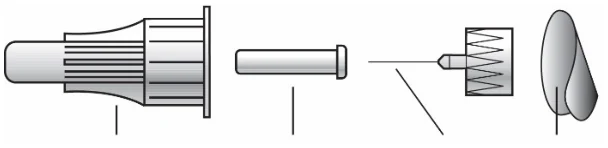
Pen Needle Parts (Needles Not Included) | Dose Knob |
| Outer Needle Shield | |
| Inner Needle Shield | |
| Needle | |
| Paper Tab | |
How to recognize your Lyumjev Junior KwikPen
- Pen colour: Taupe
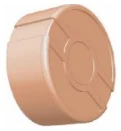
- Dose knob: Peach, with raised ridges on end and side
- Label: White with a peach colour bar, and peach, light blue and dark blue colour band
Supplies needed to give your injection
- Lyumjev Junior KwikPen, [100 units/mL]
- KwikPen compatible needle (BD [Becton, Dickinson and Company] Pen needles recommended)
- Alcohol swab
- Gauze (optional)
Preparing your Pen
- Wash your hands with soap and water.
- Check the Pen to make sure you are taking the right type of insulin. This is especially important if you use more than 1 type of insulin.
- Do not use your Pen past the expiration date printed on the label or for more than 28 days after you first start using the Pen.
- Always use a new needle for each injection to help prevent infections and blocked needles.
Step 1:
| |
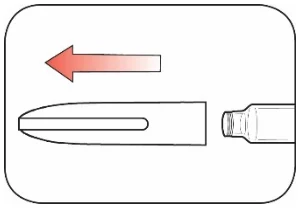
Step 2:
|
 |  |
 |
Step 3:
| |
Step 4:
| |
Step 5:
|
Priming your Pen
Prime before each injection.
- Priming your Pen means removing the air from the needle and cartridge that may collect during normal use and ensures that your Pen is working correctly.
- If you do not prime before each injection, you may get too much or too little insulin.
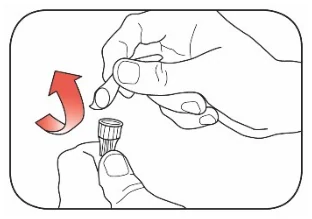
Step 6:
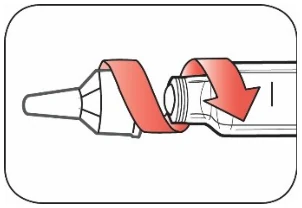
| |
Step 7:
|
 | |
 | |
 |
 | |
 |
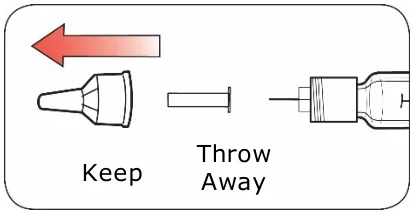
Keep Throw Away |
Step 8:
You should see insulin at the tip of the needle.
Small air bubbles are normal and will not affect your dose. |
Selecting your dose
- You can give from 0.5 (½) to 30 units in a single injection.
If your dose is more than 30 units, you will need to give more than 1 injection.
- If you need help with dividing up your dose the right way, ask your healthcare provider.
- Use a new needle for each injection and repeat the priming steps.
- If you usually need more than 30 units, ask your healthcare provider if a different Lyumjev KwikPen would be better for you.
 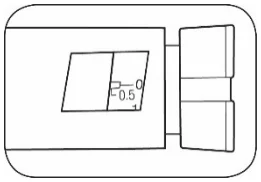 |
Step 9:
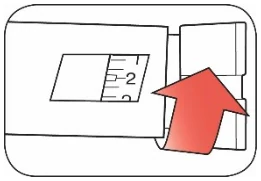
| 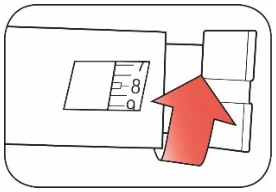 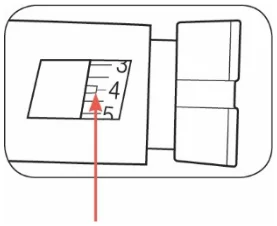 Example: 4 units shown in the dose window 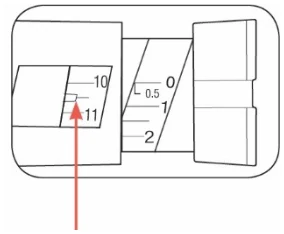 Example: 10 ½ (10.5) units shown in the dose window |
- The Pen will not let you dial more than the number of units left in the Pen.
If you need to inject more than the number of units left in the Pen, you may either:
- inject the amount left in your Pen and then use a new Pen to give the rest of your dose, or
- get a new Pen and inject the full dose.
- It is normal to see a small amount of insulin left in the Pen that you cannot inject.
Giving your injection
- Inject your insulin as your healthcare provider has shown you.
- Change (rotate) your injection site for each injection.
- Do not try to change your dose while injecting.
Step 10:
|  |
Step 11:
| 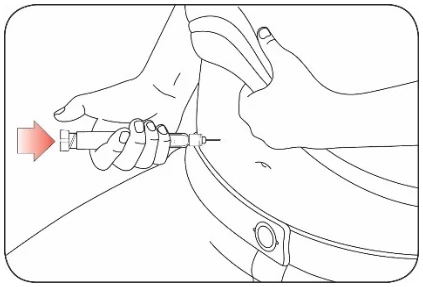 |
Do not try to inject your insulin by turning the dose knob. You will not receive your insulin by turning the dose knob. | 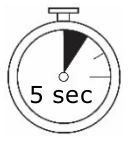 |
5 sec
Step 12:
The plunger only moves a little with each injection, and you may not notice that it moves. If you see blood after you take the needle out of your skin, press the injection site lightly with a piece of gauze or an alcohol swab. Do not rub the area. |
After your injection
Step 13:
| |
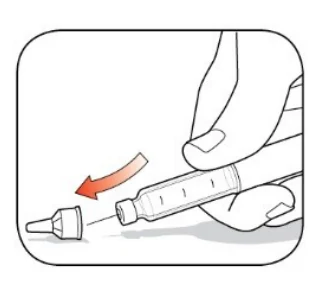
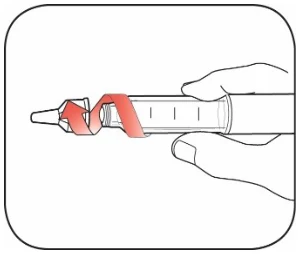
Step 14:
|
 |
 | |
 |
Step 15:
|
Disposing of Pens and needles
- Put used needles in a sharps container or a hard plastic container with a secure lid. Do not throw needles directly into your household trash.
- Dispose of the used Pen as instructed by your healthcare professional after you have removed the needle.
- Do not recycle the filled sharps container.
- Ask your healthcare provider about options to dispose of the sharps container properly. You can also check the Diabetes Canada website at www.diabetes.ca for information on sharps disposal.
- The directions regarding needle handling are not intended to replace local, healthcare provider or institutional policies.
Storing your Pen
Unused Pens
- Store unused Pens in the refrigerator at 2°C to 8°C.
- Do not freeze Lyumjev. Do not use if it has been frozen.
- Unused Pens may be used until the expiration date printed on the label if the Pen has been kept in the refrigerator.
In-use Pen
- Store the Pen you are currently using at room temperature up to 30°C. Keep away from heat and light.
- Throw away the Lyumjev Junior KwikPen you are using after 28 days, even if it still has insulin left in it.
General information about the safe and effective use of your Pen
- Keep your Pen and needles out of the sight and reach of children.
- Do not use your Pen if any part looks broken or damaged.
- Always carry an extra Pen in case yours is lost or damaged.
Troubleshooting
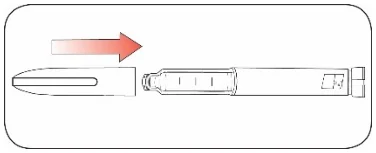
- If you cannot remove the Pen cap, gently twist the cap back and forth, and then pull the cap straight off.
If the dose knob is hard to push:
- pushing the dose knob more slowly will make it easier to inject.
- your needle may be blocked. Put on a new needle and prime the Pen.
- you may have dust, food, or liquid inside the Pen. Throw the Pen away and get a new Pen.
 |
If you have any questions or problems with your Lyumjev Junior KwikPen, contact Lilly at 1-888-545-5972 or call your healthcare provider for help. For more information on Lyumjev Junior KwikPen and insulin, go to www.lilly.ca.
Distributed by:
Eli Lilly Canada Inc.
P.O. Box 73
Toronto, Ontario
M5X 1B1
Manufactured by:
Eli Lilly and Company
Lilly Corporate Center
Indianapolis, IN 46285, USA
LYUMJEVTM and KwikPen® are trademarks owned by or licensed to Eli Lilly and Company, its subsidiaries or affiliates.
Copyright © YYYY, Eli Lilly and Company. All rights reserved.
LYUMJEV Junior KwikPen meets the current dose accuracy and functional requirements of ISO 11608-1.
The information in this document is current as of the revision date shown below. For the most current information please visit our website at www.lilly.ca or contact us directly at 1-888-545-5972.
Document Revision Date: September 14, 2021
A1-LUMKPJR-CA-IFU-0000-YYYYMMDD
Instructions for Use
LYUMJEV™ Tempo Pen™ (LOOM-jehv)
insulin lispro injection
for subcutaneous use
3 mL pen
100 units/mL

www.lilly.ca
Read the Instructions for Use before you start taking Lyumjev and each time you get another Lyumjev Tempo Pen (Pen). There may be new information. This information does not take the place of talking to your healthcare provider about your medical condition or your treatment.
The Pen is for single patient use only. Do not share your Lyumjev Tempo Pen with other people, even if the needle has been changed. Do not reuse or share needles with other people. You may give other people a serious infection or get a serious infection from them.
Lyumjev Tempo Pen is a disposable prefilled pen containing 300 units of Lyumjev.
- Your healthcare provider will tell you how many units to give as your dose and how to inject your prescribed dose of insulin.
- You can give yourself more than 1 dose from the Pen.
- Each turn of the dose knob dials 1 unit of insulin. You can give from 1 to 60 units in a single injection.
- If your dose is more than 60 units, you will need to give yourself more than 1 injection. Always check the number in the dose window to make sure you dialed the correct dose.
- The plunger only moves a little with each injection, and you may not notice that it moves. The plunger will only reach the end of the cartridge when you have used all 300 units in the Pen.
- This Tempo Pen contains a magnet that may interfere with the function of an implantable electronic medical device, such as a pacemaker, if placed in close proximity to the implanted medical device. For more information, consult your healthcare provider, refer to your implantable electronic medical device manufacturer or contact Lilly at 1-888-545-5972.
People who are blind or have vision problems should not use the Pen without help from a person trained to use the Pen.
Lyumjev Tempo Pen Parts
| Pen Cap | Cartridge Holder | Label | Dose Indicator | |||||
| Cap Clip | Rubber Seal | Plunger | Pen Body | Dose Window | Dose Knob | |||
Pen Needle Parts (Needles Not Included) | Dose Knob | |||||||
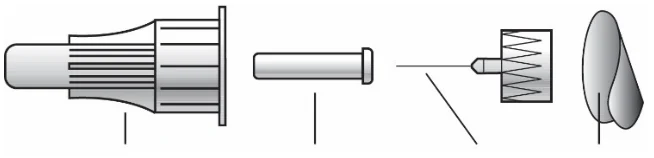
| Outer Needle Shield | Inner Needle Shield | Needle | Paper Tab |
How to recognize your Lyumjev Tempo Pen
- Pen colour: Taupe
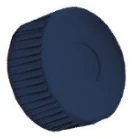
- Dose Knob: Blue, with raised ridges around the entire side
- Label: Blue and white
Supplies needed to give your injection
- Lyumjev Tempo Pen, [100 units/mL]
- Tempo Pen compatible needle (BD [Becton, Dickinson and Company] Pen needles recommended)
- Alcohol swab
- Gauze (optional)
Preparing your Pen
- Wash your hands with soap and water.
- Check the Pen to make sure you are taking the right type of insulin. This is especially important if you use more than 1 type of insulin.
- Do not use your Pen past the expiration date printed on the label or for more than 28 days after you first start using the Pen.
- Always use a new needle for each injection to help prevent infections and blocked needles.
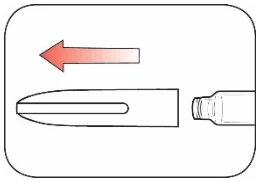
Step 1:
|
 | ||
 |  | |
 |
Step 2:
| |
Step 3:
| |
Step 4:
| |
Step 5:
|
Priming your Pen
Prime before each injection.
- Priming your Pen means removing the air from the needle and cartridge that may collect during normal use and ensures that your Pen is working correctly.
- If you do not prime before each injection, you may get too much or too little insulin.
Step 6:
| |
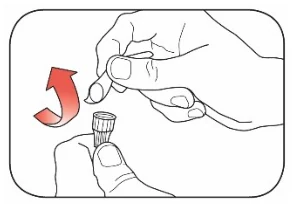
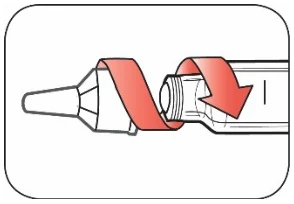
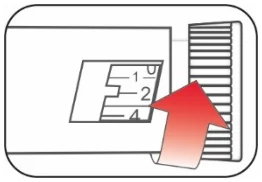
Step 7:
|
 | |
 | |
 |
 | |
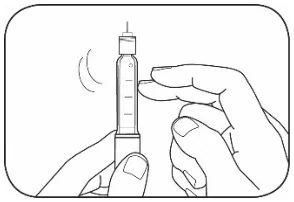 |
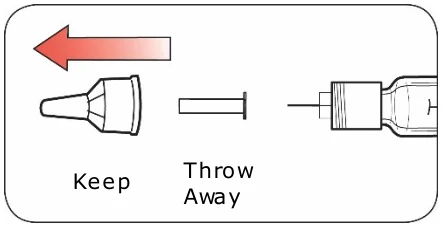
Keep Throw Away |
Step 8:
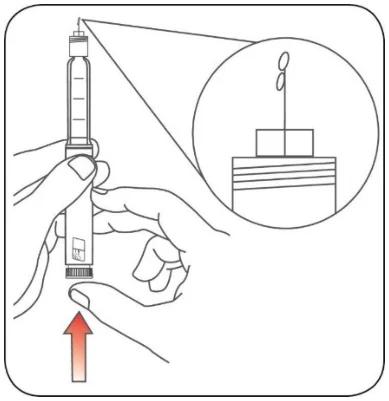
You should see insulin at the tip of the needle.
Small air bubbles are normal and will not affect your dose. |
Selecting your dose
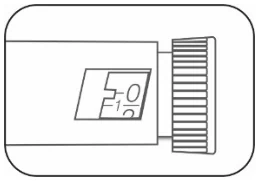
- You can give from 1 to 60 units in a single injection.
If your dose is more than 60 units, you will need to give more than 1 injection.
- If you need help with dividing up your dose the right way, ask your healthcare provider.
- Use a new needle for each injection and repeat the priming steps.
  |
Step 9:
| 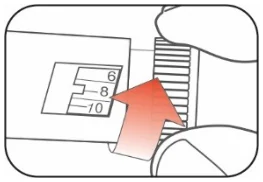 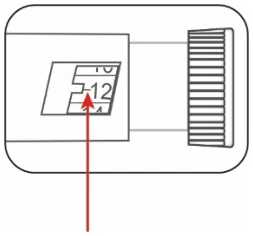 Example: 12 units shown in the dose window 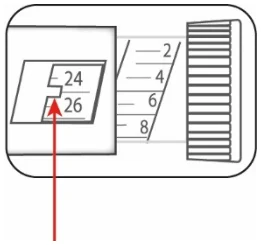 Example: 25 units shown in the dose window |
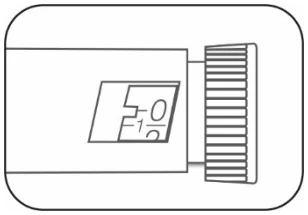
- The Pen will not let you dial more than the number of units left in the Pen.
If you need to inject more than the number of units left in the Pen, you may either:
- inject the amount left in your Pen and then use a new Pen to give the rest of your dose, or
- get a new Pen and inject the full dose.
- It is normal to see a small amount of insulin left in the Pen that you cannot inject.
Giving your injection
- Inject your insulin as your healthcare provider has shown you.
- Change (rotate) your injection site for each injection.
- Do not try to change your dose while injecting.
Step 10:
|  |
Step 11:
| 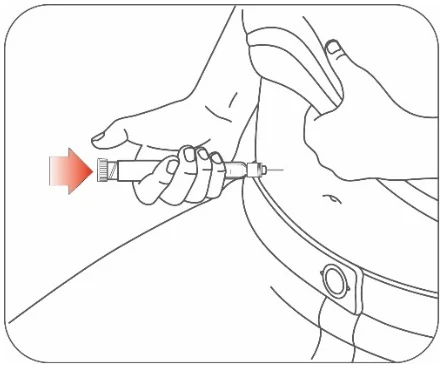 |
Do not try to inject your insulin by turning the dose knob. You will not receive your insulin by turning the dose knob. | 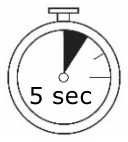 |
5 sec
Step 12:
The plunger only moves a little with each injection, and you may not notice that it moves. If you see blood after you take the needle out of your skin, press the injection site lightly with a piece of gauze or an alcohol swab. Do not rub the area. |
After your injection
Step 13:
| |
Step 14:
| |
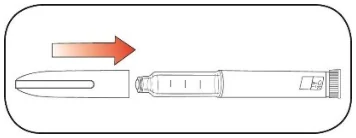
Step 15:
|
 |
 | |
 | |
 |
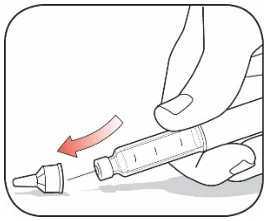
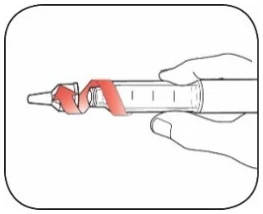
Disposing of Pens and needles
- Put used needles in a sharps container or a hard plastic container with a secure lid. Do not throw needles directly into your household trash.
- Dispose of the used Pen as instructed by your healthcare professional after you have removed the needle.
- Do not recycle the filled sharps container.
- Ask your healthcare provider about options to dispose of the sharps container properly. You can also check the Diabetes Canada website at www.diabetes.ca for information on sharps disposal.
- The directions regarding needle handling are not intended to replace local, healthcare provider or institutional policies.
Storing your Pen
Unused Pens
- Store unused Pens in the refrigerator at 2°C to 8°C.
- Do not freeze Lyumjev. Do not use if it has been frozen.
- Unused Pens may be used until the expiration date printed on the label if the Pen has been kept in the refrigerator.
In-use Pen
- Store the Pen you are currently using at room temperature up to 30°C. Keep away from heat and light.
- Throw away the Lyumjev Tempo Pen you are using after 28 days, even if it still has insulin left in it.
General information about the safe and effective use of your Pen
- Keep your Pen and needles out of the sight and reach of children.
- Do not use your Pen if any part looks broken or damaged.
- Always carry an extra Pen in case yours is lost or damaged.
Troubleshooting
- If you cannot remove the Pen cap, gently twist the cap back and forth, and then pull the cap straight off.
If the dose knob is hard to push:
- pushing the dose knob more slowly will make it easier to inject.
- your needle may be blocked. Put on a new needle and prime the Pen.
- you may have dust, food, or liquid inside the Pen. Throw the Pen away and get a new Pen.
If you have any questions or problems with your Lyumjev Tempo Pen, contact Lilly at 1-888-545-5972 or call your healthcare provider for help. For more information on Lyumjev Tempo Pen and insulin, go to www.lilly.ca.
Distributed by:
Eli Lilly Canada Inc.
P.O. Box 73
Toronto, Ontario
M5X 1B1
Manufactured by:
Eli Lilly and Company
Lilly Corporate Center
Indianapolis, IN 46285, USA
LYUMJEVT M and Tempo PenT M are trademarks owned by or licensed to Eli Lilly and Company, its subsidiaries or affiliates.
Copyright © YYYY, Eli Lilly and Company. All rights reserved.
LYUMJEV Tempo Pen meets the current dose accuracy and functional requirements of ISO 11608-1.
The information in this document is current as of the revision date shown below. For the most current information please visit our website at www.lilly.ca or contact us directly at 1-888-545-5972.
Document Revision Date: September 14, 2021
A1-LUMTP-CA-IFU-0000-YYYYMMDD
Instructions for Use
LYUMJEVTM KwikPen® (LOOM-jehv)
insulin lispro injection
for subcutaneous use
3 mL pen
200 units/mL
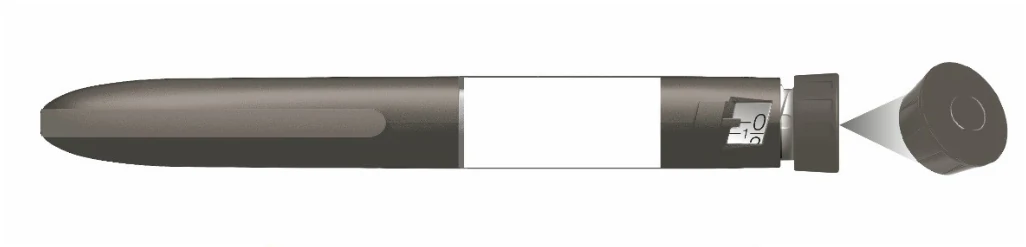
www.lilly.ca
Read the Instructions for Use before you start taking Lyumjev and each time you get another Lyumjev KwikPen (Pen). There may be new information. This information does not take the place of talking to your healthcare provider about your medical condition or your treatment.
The Pen is for single patient use only. Do not share your Lyumjev KwikPen with other people, even if the needle has been changed. Do not reuse or share needles with other people. You may give other people a serious infection or get a serious infection from them.
Lyumjev KwikPen is a disposable prefilled pen containing 600 units of Lyumjev.
- Your healthcare provider will tell you how many units to give as your dose and how to inject your prescribed dose of insulin.
- You can give yourself more than 1 dose from the Pen.
- Each turn of the dose knob dials 1 unit of insulin. You can give from 1 to 60 units in a single injection.
- If your dose is more than 60 units, you will need to give yourself more than 1 injection. Always check the number in the dose window to make sure you dialed the correct dose.
- The plunger only moves a little with each injection, and you may not notice that it moves. The plunger will only reach the end of the cartridge when you have used all 600 units in the Pen.
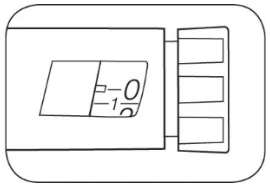
This Pen is designed to allow you to give more doses than other pens you may have used in the past. Dial your usual dose as instructed by your healthcare provider.
Lyumjev KwikPen is available in two strengths, 100 units/mL and 200 units/mL. Inject Lyumjev 200 units/mL only with your Pen. Do not transfer insulin from your Pen to a syringe. Syringes will not measure 200 units/mL of insulin correctly. A severe overdose can result, causing very low blood sugar which may put your life in danger.
People who are blind or have vision problems should not use the Pen without help from a person trained to use the Pen.
DO NOT TRANSFER TO A SYRINGE SEVERE OVERDOSE CAN RESULT
Lyumjev KwikPen Parts
| Pen Cap | Cartridge Holder | Label | Dose Indicator | |||
| Cap Clip | Rubber Seal | Plunger | Pen Body | Dose Window | Dose Knob | |
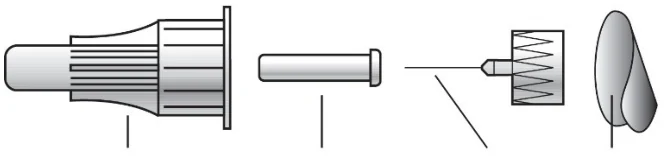
Pen Needle Parts (Needles Not Included) | Dose Knob | |||||
| Outer Needle Shield | Inner Needle Shield | Needle | Paper Tab |
How to recognize your Lyumjev KwikPen
- Pen colour: Taupe
- Dose Knob: Taupe, with raised ridges on side
- Label: White with a blue colour bar and checkerboard design. Yellow warning on cartridge holder.
Supplies needed to give your injection
- Lyumjev KwikPen, [200 units/mL]
- KwikPen compatible needle (BD [Becton, Dickinson and Company] Pen needles recommended)
- Alcohol swab
- Gauze (optional)
Preparing your Pen
- Wash your hands with soap and water.
- Check the Pen to make sure you are taking the right type of insulin. This is especially important if you use more than 1 type of insulin.
- Do not use your Pen past the expiration date printed on the label or for more than 28 days after you first start using the Pen.
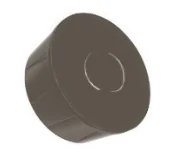
- Always use a new needle for each injection to help prevent infections and blocked needles.
 | ||
 |  | |
Step 1:
| |
Step 2:
| |
Step 3:
| |
Step 4:
| |
Step 5:
|
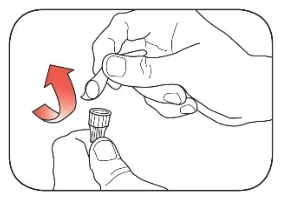
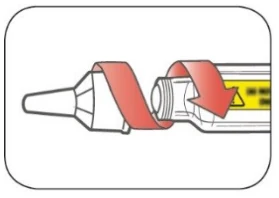
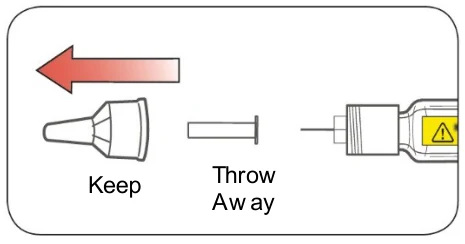
Priming your Pen
Prime before each injection.
- Priming your Pen means removing the air from the needle and cartridge that may collect during normal use and ensures that your Pen is working correctly.
- If you do not prime before each injection, you may get too much or too little insulin.
Step 6:
|
 | |
 | |
 |
 |
 DO NOT TRANSFER TO A SYRINGE SEVERE OVERDOSE CAN RESULT | |
Keep Throw Aw ay |
Step 7:
| |
Step 8:
You should see insulin at the tip of the needle.
Small air bubbles are normal and will not affect your dose. |
Selecting your dose
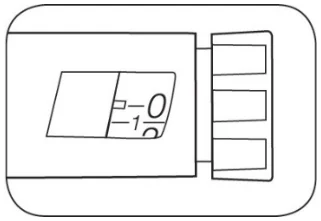
This Pen has been designed to deliver the dose that is shown in the dose window. Dial your usual dose as instructed by your healthcare provider.
- You can give from 1 to 60 units in a single injection.
If your dose is more than 60 units, you will need to give more than 1 injection.
- If you need help dividing up your dose the right way, ask your healthcare provider.
- Use a new needle for each injection and repeat the priming steps.
 | |
  |
Step 9:
| 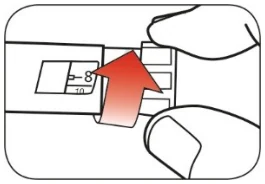 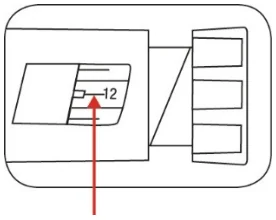 Example: 12 units shown in the dose window 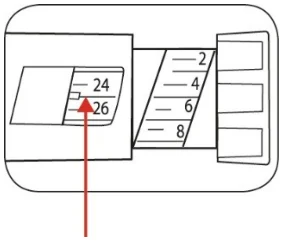 Example: 25 units shown in the dose window |
- The Pen will not let you dial more than the number of units left in the Pen.
If you need to inject more than the number of units left in the Pen, you may either:
- inject the amount left in your Pen and then use a new Pen to give the rest of your dose, or
- get a new Pen and inject the full dose.
- It is normal to see a small amount of insulin left in the Pen that you cannot inject. Do not transfer this to a syringe. Severe overdose can result.
Giving your injection
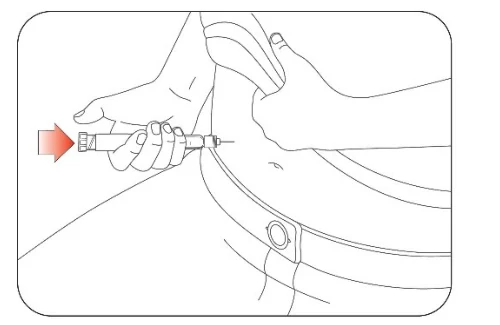
- Inject your insulin as your healthcare provider has shown you.
- Change (rotate) your injection site for each injection.
- Do not try to change your dose while injecting.
Step 10:
|  |
Step 11:
|  |
Do not try to inject your insulin by turning the dose knob. You will not receive your insulin by turning the dose knob. | 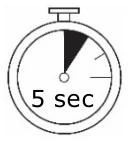 |
5 sec
Step 12:
The plunger only moves a little with each injection, and you may not notice that it moves. If you see blood after you take the needle out of your skin, press the injection site lightly with a piece of gauze or an alcohol swab. Do not rub the area. |
After your injection
Step 13:
| |
Step 14:
|
 |
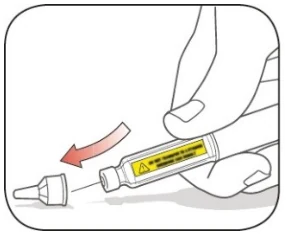 | |
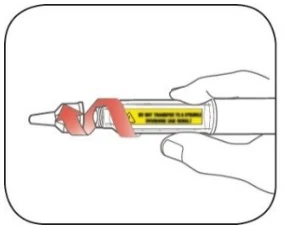 |
Step 15:
|
Disposing of Pens and needles
- Put used needles in a sharps container or a hard plastic container with a secure lid. Do not throw needles directly into your household trash.
- Dispose of the used Pen as instructed by your healthcare professional after you have removed the needle.
- Do not recycle the filled sharps container.
- Ask your healthcare provider about options to dispose of the sharps container properly. You can also check the Diabetes Canada website at www.diabetes.ca for information on sharps disposal.
- The directions regarding needle handling are not intended to replace local, healthcare provider or institutional policies.
Storing your Pen
Unused Pens
- Store unused Pens in the refrigerator at 2°C to 8°C.
- Do not freeze Lyumjev. Do not use if it has been frozen.
- Unused Pens may be used until the expiration date printed on the label if the Pen has been kept in the refrigerator.
In-use Pen
- Store the Pen you are currently using at room temperature up to 30°C. Keep away from heat and light.
- Throw away the Lyumjev KwikPen you are using after 28 days, even if it still has insulin left in it.
General information about the safe and effective use of your Pen
- Keep your Pen and needles out of the sight and reach of children.
- Do not use your Pen if any part looks broken or damaged.
- Always carry an extra Pen in case yours is lost or damaged.
Troubleshooting
- If you cannot remove the Pen cap, gently twist the cap back and forth, and then pull the cap straight off.
If the dose knob is hard to push:
- pushing the dose knob more slowly will make it easier to inject.
- your needle may be blocked. Put on a new needle and prime the Pen.
- you may have dust, food, or liquid inside the Pen. Throw the Pen away and get a new Pen.
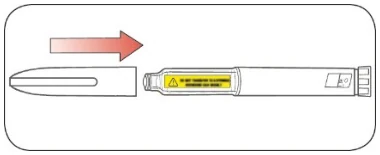 |
If you have any questions or problems with your Lyumjev KwikPen, contact Lilly at 1-888-545-5972 or call your healthcare provider for help. For more information on Lyumjev KwikPen and insulin, go to www.lilly.ca.
Distributed by:
Eli Lilly Canada Inc.
P.O. Box 73
Toronto, Ontario
M5X 1B1
Manufactured by:
Eli Lilly and Company
Lilly Corporate Center
Indianapolis, IN 46285, USA
LYUMJEVTM and KwikPen® are trademarks owned by or licensed to Eli Lilly and Company, its subsidiaries or affiliates.
Copyright © YYYY, Eli Lilly and Company. All rights reserved.
LYUMJEV KwikPen meets the current dose accuracy and functional requirements of ISO 11608-1.
The information in this document is current as of the revision date shown below. For the most current information please visit our website at www.lilly.ca or contact us directly at 1-888-545-5972.
Document Revision Date: September 14, 2021
A1-LUMKP200-CA-IFU-0000-YYYYMMDD