


Patient Medication Information: uses, side effects, how to take - Plosbrio
Serious Warnings and Precautions
What PLOSBRIO™ is used for:
- PLOSBRIO™ contains the active substance semaglutide. It is used to lower blood sugar (glucose) in adults with type 2 diabetes.
- PLOSBRIO™ is used on its own if your blood sugar level is not properly controlled by diet and exercise alone and you cannot use metformin.
- PLOSBRIO™ is used in combination with one or more other medicines for diabetes when they are not enough to control your blood sugar levels. These other medicines may include: oral antidiabetics (such as metformin, sulfonylurea, or sodium glucose co-transporter 2 inhibitor medicines) or insulin.
- PLOSBRIO™ is used to reduce the risk of serious heart issues (heart-related death, heart attacks, strokes) in adults with type 2 diabetes and a history of heart disease (like a heart attack, stroke or poor blood flow to the limbs) or chronic kidney disease.
- PLOSBRIO™ is also used to prevent the worsening of your kidney disease if you have both chronic kidney disease and type 2 diabetes.
Possible Risk of thyroid tumours, including cancer As part of drug testing, semaglutide, the active ingredient in PLOSBRIO™ was given to rats and mice in long term studies. In these studies, semaglutide caused both rats and mice to develop medullary thyroid tumours, some of which were cancer. It is not known if semaglutide will cause thyroid tumours or a rare type of thyroid cancer called medullary thyroid cancer in people. Do not use PLOSBRIO™ if you or any of your family have ever had a type of thyroid cancer called medullary thyroid carcinoma (MTC), or if you have an endocrine system condition called Multiple Endocrine Neoplasia syndrome type 2 (MEN 2). While taking PLOSBRIO™, tell your doctor if you get a lump or swelling in your neck, hoarseness, trouble swallowing or shortness of breath. These may be symptoms of thyroid cancer. You should discuss any safety concerns you have about the use of PLOSBRIO™ with your doctor. |
- It is important that you keep following any diet and lifestyle advice from your doctor, pharmacist or nurse while using PLOSBRIO™.
- PLOSBRIO™ is not a substitute for insulin. PLOSBRIO™ should not be used in patients with Type 1 diabetes mellitus (formerly known as insulin-dependent diabetes mellitus or IDDM), or for treatment of diabetic ketoacidosis.
How PLOSBRIO™ works:
PLOSBRIO™ belongs to a class of medicines called GLP-1 receptor agonists (glucagon-like peptide-1 receptor agonists). PLOSBRIO™ helps your body make more insulin when your blood sugar is high.
The ingredients in PLOSBRIO™ are:
Medicinal ingredients: semaglutide. One mL solution for injection contains 0.68 mg, 1.34 mg or 2.68 mg semaglutide.
Non-medicinal ingredients: disodium phosphate dihydrate, propylene glycol, phenol, and water for injections.
PLOSBRIO™ comes in the following dosage forms:
PLOSBRIO™ is supplied as a clear and colourless solution for injection in a pre-filled pen.
PLOSBRIO™ is available in a carton of 1 disposable, pre-filled, multi-dose pen delivering doses of 0.25 mg or 0.5 mg, including 6 or 8 disposable needles. This pack size is intended to be used for dose escalation and maintenance treatment at the 0.5 mg dose. The pen contains 1.5 mL or 3 mL solution.
PLOSBRIO™ is available in a carton of 1 disposable, pre-filled, multi-dose pen delivering only doses of 1 mg, including 4 or 8 disposable needles. This pack size is intended to be used for maintenance treatment at the 1 mg dose only. The pen contains 3 mL solution.
PLOSBRIO™ is also available in a carton of 1 disposable, pre-filled, multi-dose pen delivering only doses of 2 mg, including 4 disposable needles. This pack size is intended to be used for maintenance treatment at the 2 mg dose only. The pen contains 3 mL solution.
Do not use PLOSBRIO™ if:
- You are allergic to semaglutide or any of the other ingredients of this medicine.
- You or a member of your family has ever had medullary thyroid cancer (MTC).
- You have Multiple Endocrine Neoplasia syndrome type 2 (MEN 2).
You are pregnant or breastfeeding.
To help avoid side effects and ensure proper use, talk to your healthcare professional before you take PLOSBRIO™. Talk about any health conditions or problems you may have, including if you:
- or a member of your family has or has had medullary thyroid carcinoma (MTC), or if you have Multiple Endocrine Neoplasia syndrome type 2 (MEN 2).
- Have type 1 diabetes.
- Have ever had diabetic ketoacidosis (increased ketones in the blood or urine).
- Have ever had an allergic reaction to PLOSBRIO™.
- Have a high heart rate (fast pulse).
- Have ever had pancreatitis.
- Are breastfeeding or plan to breastfeed.
- Are pregnant or plan to become pregnant.
- Have end stage renal disease.
- Have gastrointestinal (digestive) problems, including severe vomiting, diarrhea and/or dehydration.
- Have hepatic (liver) disease.
- Have diabetic retinopathy.
- take blood thinners (ex. Warfarin/Coumadin).
Other warnings you should know about:
Food or liquid getting into lungs during anaesthesia or sedation
Some patients taking medicines like PLOSBRIO™ have had problems with food or liquid from their stomach getting into their lungs while under general anaesthesia or sedation.
Tell your healthcare professional that you are taking PLOSBRIO™ before you have a procedure that requires general anaesthesia or sedation.
Cardiovascular
PLOSBRIO™ may increase heart rate and could cause changes known as PR prolongation, which are detected by electrocardiogram (ECG) tracings. Increased heart rate is the same as a faster pulse. These heart rhythm changes are more likely if you have heart disease, or if you are taking certain other drugs. It is important to follow your doctor's advice about the dose of PLOSBRIO™ or about any special tests that you may need. See ‘Possible side effects from using PLOSBRIO™?’
Children and adolescents
PLOSBRIO™ is not recommended in children and adolescents under 18 years as the safety and efficacy in this age group have not yet been established.
Pregnancy and breastfeeding
Tell your doctor if you are pregnant, think you might be pregnant, or are planning to become pregnant. PLOSBRIO™ should not be used during pregnancy and for at least two months before a planned pregnancy because it is not known if it may affect your unborn child.
If you could become pregnant while using PLOSBRIO™, it is recommended to use contraception.
Do not use this medicine if you are breast-feeding. This is because it is not known if PLOSBRIO™ passes into breast milk.
Driving and using machines
Low blood sugar (hypoglycemia) may affect your ability to concentrate. Avoid driving or using machines if you get any signs of low blood sugar. See Possible side effects from using PLOSBRIO™ for the warning signs of low blood sugar. You may feel dizzy when taking PLOSBRIO™, especially if your dose is being increased. If you feel dizzy, avoid driving or using machines. Talk to your doctor for further information.
Severe and on-going stomach pain which could be due to acute pancreatitis
If you have severe and on-going pain in the stomach area – see a doctor straight away as this could be a sign of acute pancreatitis (inflamed pancreas).
Effects on the digestive system, including dehydration
During treatment with PLOSBRIO™, you may experience feeling sick (nausea) or being sick (vomiting), and diarrhea. These side effects can cause dehydration (loss of fluids). It is therefore important to drink plenty of fluids to prevent dehydration. Talk to your doctor if you have any questions or concerns.
Patients with delayed stomach emptying (gastroparesis)
If you have slow (delayed) stomach emptying (called gastroparesis), use of PLOSBRIO™ may lead to serious or severe gastrointestinal adverse events. Talk to your doctor before using PLOSBRIO™.
Diabetic eye disease (retinopathy)
Fast improvements in blood sugar control may lead to a temporary worsening of diabetic eye disease. This may require treatment or lead to a loss of vision. You should inform your doctor if you have diabetic eye disease (retinopathy) or if you experience eye problems during treatment with PLOSBRIO™.
Sudden changes to your eyesight
If you notice a sudden loss of vision or rapidly worsening eyesight during treatment with this medicine, urgently contact your doctor. This may be caused by a very rare side effect called non-arteritic anterior ischaemic optic neuropathy (NAION). Your doctor will refer you for an eye examination by an ophthalmologist and you may have to stop treatment with this medicine.
Low blood sugar (hypoglycemia)
Taking a sulfonylurea medicine or insulin with PLOSBRIO™ might increase the risk of getting low blood sugar levels (hypoglycemia). Your doctor may ask you to test your blood sugar levels. This will help your doctor decide if the dose of the sulfonylurea or insulin needs to be changed to reduce the risk of low blood sugar.
Tell your healthcare professional about all the medicines you take, including any drugs, vitamins, minerals, natural supplements or alternative medicines.
In particular, tell your doctor, pharmacist or nurse if you are using medicines containing any of the following:
- Sulfonylurea
- Insulin
Combining these medicines with PLOSBRIO™ might increase the risk of getting low blood sugar (hypoglycemia). Please see Possible side effects from using PLOSBRIO™ for the warning signs of low blood sugar. Your doctor may tell you to lower your regular dose levels of these drugs when adding PLOSBRIO™ treatment.
The following may interact with PLOSBRIO™:
The following list includes some, but not all, of the drugs that may increase your heart rate. You should check with your doctor or pharmacist before taking any other medication with PLOSBRIO™:
- Drugs to treat hypertension.
- Drugs to treat heart failure.
- Drugs to treat HIV infection.
- Drugs to treat attention deficit-hyperactivity disorder.
- Drugs to suppress appetite/cause weight loss.
- Decongestants.
- Drugs to treat asthma.
How to take PLOSBRIO™:
PLOSBRIO™ is given as an injection under the skin (subcutaneous injection). Do not inject it into a vein or muscle. The best places to give the injection are the front of your thighs, the front of your waist (abdomen), or your upper arm.
Before you use the pen for the first time, your doctor or Diabetes Nurse Educator will show you how to use it.
Detailed instructions for use are on the other side of this leaflet.
Always use this medicine exactly as your doctor has told you. Check with your doctor, pharmacist or nurse if you are not sure.
You should use PLOSBRIO™ once a week on the same day each week if possible. You can give yourself the injection at any time of the day – regardless of meals. To help you remember to inject PLOSBRIO™ once a week only, it is recommended to note the chosen weekday (e.g. Wednesday) on the carton. You can also write the date on the carton every time you have injected PLOSBRIO™.
If necessary you can change the day of your weekly injection of PLOSBRIO™ as long as it has been at least 2 days since your last injection of PLOSBRIO™.
Do not stop using PLOSBRIO™ without talking to your doctor. If you stop using it, your blood sugar levels may increase.
Usual dose:
When you first start using PLOSBRIO™, the starting dose is 0.25 mg once a week for four weeks. After four weeks you should increase your dose to 0.5 mg once a week. Talk to your doctor before increasing your dose.
Your doctor may increase your dose to 1 mg once a week if your blood sugar is not controlled well enough with a dose of 0.5 mg.
Your doctor may increase your dose to 2 mg once a week if your blood sugar is not controlled well enough with a dose of 1 mg.
Do not change your dose unless your doctor has told you to.
Overdose:
If you use more PLOSBRIO™ than you should, talk to your doctor straight away. You may get side effects such as feeling sick (nausea) or being sick (vomiting), or diarrhea.
| If you think you, or a person you are caring for, have taken too much PLOSBRIO™, contact a healthcare professional, hospital emergency department, regional poison control centre or |
|---|
| Health Canada’s toll-free number, 1-844 POISON-X (1-844-764-7669) immediately, even if there are no signs or symptoms. |
Missed Dose:
If you forgot to inject a dose and:
- It is 5 days or less since you should have used PLOSBRIO™, use it as soon as you remember. Then inject your next dose as usual on your scheduled day.
- It is more than 5 days since you should have used PLOSBRIO™, skip the missed dose. Then inject your next dose as usual on your scheduled day.
Do not take an extra dose or increase the dose to make up for a missed dose.
Possible side effects from using PLOSBRIO™:
These are not all the possible side effects you may feel when taking PLOSBRIO™. If you experience any side effects not listed here, contact your healthcare professional.
Like all medicines, this medicine can cause side effects, although not everybody gets them.
Very common: may affect more than 1 in 10 people
- Feeling sick (nausea) – this usually goes away over time
- Diarrhea – this usually goes away over time
- Low blood sugar (hypoglycemia) when PLOSBRIO™ is used with a sulfonylurea or insulin.
The warning signs of low blood sugar may come on suddenly. They can include: cold sweat, cool pale skin, headache, fast heartbeat, feeling sick (nausea) or very hungry, changes in vision, feeling sleepy or weak, feeling nervous, anxious or confused, difficulty concentrating or shaking.
Your doctor will tell you how to treat low blood sugar and what to do if you notice these warning signs.
Common: may affect up to 1 in 10 people
- Headache
- Being sick (vomiting)
- Low blood sugar (hypoglycemia) when PLOSBRIO™ is used with an oral antidiabetic other than a sulfonylurea
- Indigestion
- Inflamed stomach (‘gastritis’) - the signs also include stomach ache, feeling sick (nausea), or being sick (vomiting)
- Reflux or heartburn – also called ‘gastro-esophageal reflux disease’ (GERD)
- Stomach pain
- Bloating of the stomach
- Constipation
- Burping
- Gall stones
- Feeling dizzy
- Feeling tired
- Weight loss
- Less appetite
- Gas (flatulence)
- Increase of pancreatic enzymes (such as lipase and amylase)
- Complications of diabetic eye disease (retinopathy)
Uncommon: may affect up to 1 in 100 people
- Change in the way food or drink tastes
- Fast pulse
- Injection site reactions – such as bruising, pain, irritation, itching and rash
- Allergic reactions like rash, itching or hives
Unknown:
- Intestinal obstruction including ileus: a condition where your intestine can’t push food and waste out of your body (can cause bowel obstruction, a severe form of constipation with additional symptoms such as stomach ache, bloating, vomiting etc.)
- A delay in emptying of the stomach
Rare: may affect up to 1 in 1,000 people
Severe allergic reactions (anaphylactic reactions, angioedema). You should seek immediate medical help and inform your doctor straight away if you get symptoms such as breathing problems, swelling of face, lips, tongue and/or throat with difficulty swallowing and a fast heartbeat.
Serious side effects and what to do about them
| Frequency/Side Effect/Symptom | Talk to your healthcare professional | Stop taking this drug and get immediate medical help | |
|---|---|---|---|
| Only if severe | In all cases | ||
| Common | |||
| Diabetic retinopathy complications – complications of diabetic eye disease/diabetic eye problems | √ | ||
| Uncommon | |||
| Pancreatitis (severe and ongoing pain in the stomach area which could be a sign of inflamed pancreas) | √ | √ | |
| Severe hypoglycemia* (low blood sugar) symptoms: feeling confused, fits and passing out | √ | √ | |
| Rare | |||
| Severe allergic reaction (anaphylactic reaction, angioedema) symptoms: breathing problems, swelling of face, lips, tongue and/or throat with difficulty swallowing and a fast heartbeat | √ | √ | |
| Very Rare | |||
| Non-arteritic anterior ischemic optic neuropathy (sudden vision loss, may be painless, from swelling of eye nerves): blurring or cloudiness of vision, headaches | √ | √ | |
*The risk of severe hypoglycemia may be higher when you also take other diabetes medications.
If you have a troublesome symptom or side effect that is not listed here or becomes bad enough to interfere with your daily activities, talk to your healthcare professional.
Reporting Side Effects
You can report any suspected side effects associated with the use of health products to Health Canada by:
NOTE: Contact your health professional if you need information about how to manage your side effects. The Canada Vigilance Program does not provide medical advice. |
Storage:
Keep this medicine out of the sight and reach of children.
Do not use this medicine after the expiry date which is stated on the pen label and carton after ʻEXP’. The expiry date refers to the last day of that month.
Before opening:
Store in a refrigerator (2°C – 8°C). Do not freeze. Keep away from the cooling element.
During use:
- You can keep the pen for 8 weeks when stored at a temperature below 30°C or in a refrigerator (2°C – 8°C). Do not freeze.
- When you are not using the pen, keep the pen cap on in order to protect it from light.
Do not use this medicine if the solution is not clear and colourless.
Do not throw away any medicines via wastewater or household waste. Ask your pharmacist how to throw away medicines you no longer use. These measures will help protect the environment.
If you want more information about PLOSBRIO™:
- Talk to your healthcare professional
Find the full product monograph that is prepared for healthcare professionals and includes this Patient Medication Information by visiting the Health Canada Drug Product Database website (Drug Product Database: Access the database); the manufacturer’s
- website (www.novonordisk.ca), or by calling 1-800-465-4334.
Date of Authorization: 2026-08-06
PLOSBRIO™ and NovoFine® are trademarks of Novo Nordisk A/S and used under license by Novo Nordisk Canada Inc.
© 2026
Novo Nordisk Canada Inc.
Instructions on how to use PLOSBRIO™ solution for injection in pre-filled pen 0.25 mg or 0.5 mg doses (1.5 mL) | |||
|---|---|---|---|
Please read these instructions carefully before using your PLOSBRIO™ pre-filled pen. Talk to your doctor, nurse or pharmacist about how to inject PLOSBRIO™ correctly. Start by checking your pen to make sure that it contains PLOSBRIO™ 0.25 mg or 0.5 mg doses, then look at the illustrations below to get to know the different parts of your pen and needle. If you are blind or have poor eyesight and cannot read the dose counter on the pen, do not use this pen without help. Get help from a person with good eyesight who is trained to use the PLOSBRIO™ pre-filled pen. Your pen is a pre-filled dial-a-dose pen. It contains 2 mg of semaglutide, and you can select doses of 0.25 mg or 0.5 mg. One unused pen contains:
Your pen is designed to be used with NovoFine® disposable needles up to a length of 8 mm. Disposable needles are included in the pack. | PLOSBRIO™ pre-filled pen and needle (example) Pen cap Outer needle cap Inner needle cap Needle Paper tab Pen window Pen label Dose counter Dose pointer Dose selector Dose button Flow check symbol P L O S B R I O 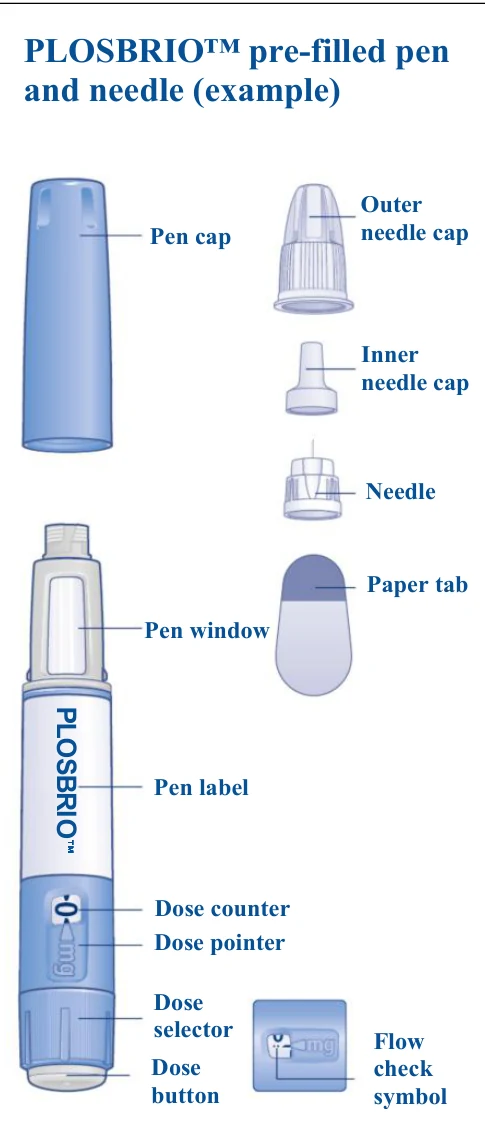  | ||
Important information Pay special attention to these notes, as they are important for safe use of the pen. | |||
| |||
| A 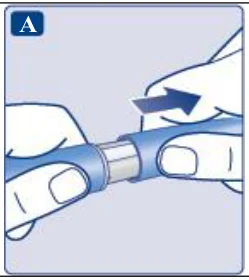 | ||
| B 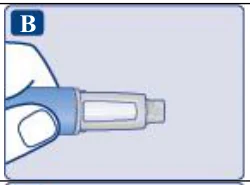 | ||
| C 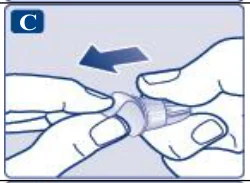 | ||
Make sure to attach the needle correctly.
| D 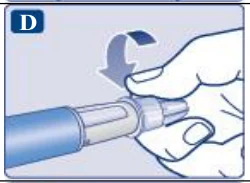 | ||
The needle is covered by two caps. You must remove both caps. If you forget to remove both caps, you will not inject any solution.
| E 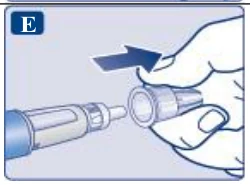 | ||
A drop of solution may appear at the needle tip. This is normal, but you must still check the flow, if you use a new pen for the first time. Do not attach a new needle to your pen until you are ready to take your injection. | F 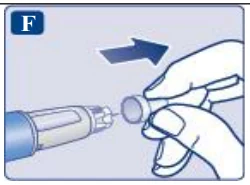 | ||
Always use a new needle for each injection. This may prevent blocked needles, contamination, infection and inaccurate dosing. | |||
| Never use a bent or damaged needle. | |||
| |||
 | A Flow check symbol selected 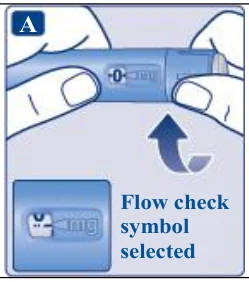 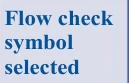 | ||
| B 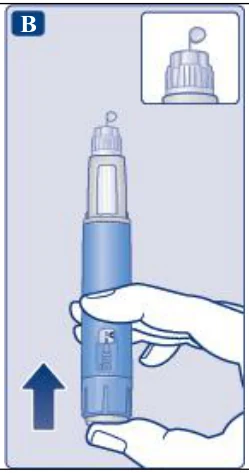 | ||
A small drop may remain at the needle tip, but it will not be injected. If no drop appears, repeat step 2 ‘Check the flow with each new pen’ up to 6 times. If there is still no drop, change the needle and repeat step 2 ‘Check the flow with each new pen’ once more. Dispose of the pen and use a new one if a drop of solution still does not appear. | |||
Always make sure that a drop appears at the needle tip before you use a new pen for the first time. This makes sure that the solution flows. If no drop appears, you will not inject any medicine even though the dose counter may move. This may indicate a blocked or damaged needle. If you do not check the flow before your first injection with each new pen, you may not get the prescribed dose and the intended effect of PLOSBRIO™. | |||
| |||
| A Example 0.25 mg selected 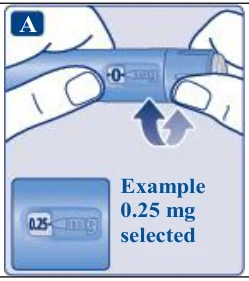  | ||
The dose selector changes the dose. Only the dose counter and dose pointer will show how many mg you select per dose. You can select up to 0.5 mg per dose. When your pen contains less than 0.5 mg, the dose counter stops before 0.5 is shown. The dose selector clicks differently when turned forwards, backwards or past the number of mg left. Do not count the pen clicks. | |||
Always use the dose counter and the dose pointer to see how many mg you have selected before injecting this medicine. Do not count the pen clicks. Only doses of 0.25 mg or 0.5 mg must be selected with the dose selector. The selected dose must line up precisely with the dose pointer to ensure that you get a correct dose. | |||
| How much solution is left | |||
| A Example Dose counter stopped: 0.25 mg left 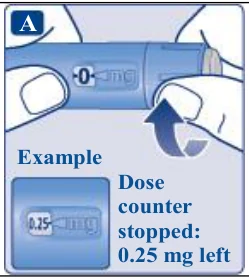   | ||
| If there is not enough solution left in your pen for a full dose, do not use it. Use a new PLOSBRIO™ pen. | |||
| |||
| A 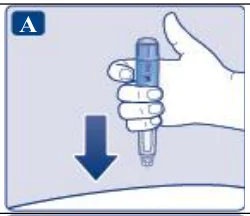 | ||
| B 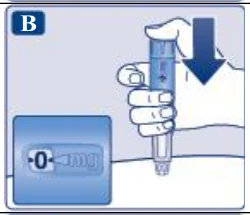 | ||
| C 1-2-3-4-5-6 Count slowly: 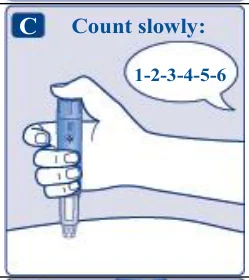   | ||
| D 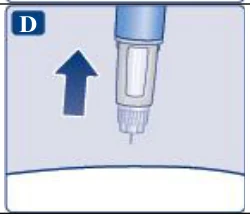 | ||
| You may see a drop of solution at the needle tip after injecting. This is normal and does not affect your dose. | |||
Always watch the dose counter to know how many mg you inject. Hold the dose button down until the dose counter shows 0. How to identify a blocked or damaged needle
| |||
| Never touch the dose counter when you inject. This can interrupt the injection. | |||
| |||
Always dispose of the needle after each injection to ensure convenient injections and prevent blocked needles. If the needle is blocked, you will not inject any medicine. Unscrew the needle and dispose of it carefully as instructed by your doctor, nurse, pharmacist or local authorities. | |||
| A 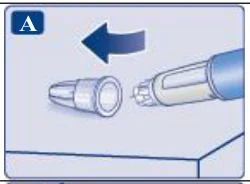 | ||
| B 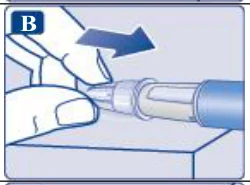 | ||
| C 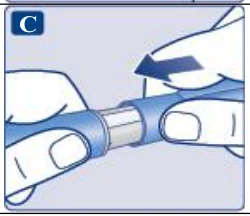 | ||
Always dispose of the needle after each injection to ensure convenient injections and prevent blocked needles. If the needle is blocked, you will not inject any medicine. When the pen is empty, throw it away without a needle on as instructed by your doctor, nurse, pharmacist or local authorities. | |||
Never try to put the inner needle cap back on the needle. You may stick yourself with the needle. Always remove the needle from your pen immediately after each injection. This may prevent blocked needles, contamination, infection, leakage of solution and inaccurate dosing. | |||
| Further important information | |||
| |||
| Caring for your pen | |||
| Treat your pen with care. Rough handling or misuse may cause inaccurate dosing, which may lead to high blood sugar levels or abdominal discomfort such as nausea or vomiting. | |||
| |||
| |||
Instructions on how to use PLOSBRIO™ solution for injection in pre-filled pen 0.25 mg or 0.5 mg doses (3 mL) | |||
|---|---|---|---|
Please read these instructions carefully before using your PLOSBRIO™ pre-filled pen. Talk to your doctor, nurse or pharmacist about how to inject PLOSBRIO™ correctly. Start by checking your pen to make sure that it contains PLOSBRIO™ 0.25 mg or 0.5 mg doses, then look at the illustrations below to get to know the different parts of your pen and needle. If you are blind or have poor eyesight and cannot read the dose counter on the pen, do not use this pen without help. Get help from a person with good eyesight who is trained to use the PLOSBRIO™ pre-filled pen. Your pen is a pre-filled dial-a-dose pen. It contains 2 mg of semaglutide, and you can select doses of 0.25 mg or 0.5 mg. One unused pen contains:
Your pen is designed to be used with NovoFine® disposable needles up to a length of 8 mm. Disposable needles are included in the pack. | PLOSBRIO™ pre-filled pen and needle (example) Pen cap Outer needle cap Inner needle cap Needle Paper tab Pen window Pen label Dose counter Dose pointer Dose selector Dose button Flow check symbol P L O S B R I O 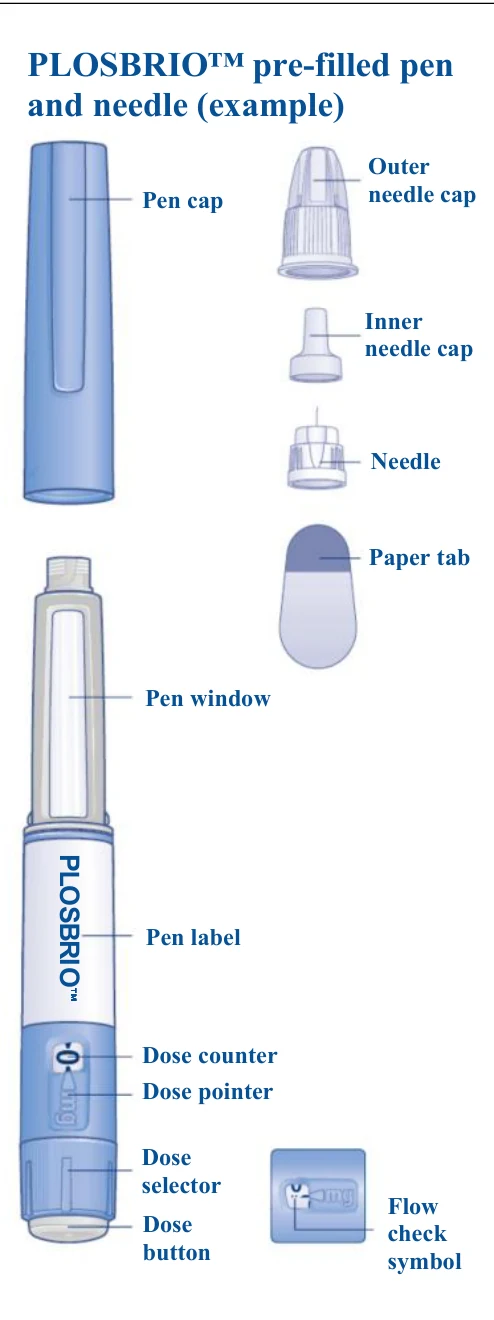  | ||
Important information Pay special attention to these notes, as they are important for safe use of the pen. | |||
| |||
| A 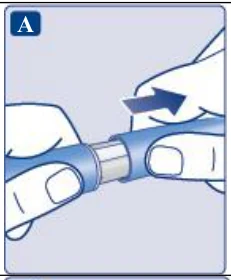 | ||
| B 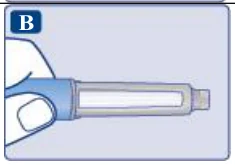 | ||
| C 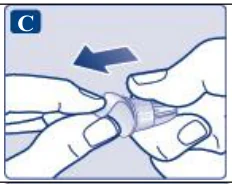 | ||
Make sure to attach the needle correctly
| D 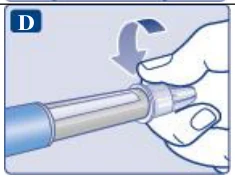 | ||
The needle is covered by two caps. You must remove both caps. If you forget to remove both caps, you will not inject any solution.
| E 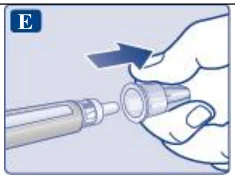 | ||
A drop of solution may appear at the needle tip. This is normal, but you must still check the flow, if you use a new pen for the first time. Do not attach a new needle to your pen until you are ready to take your injection. | F 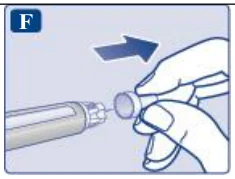 | ||
Always use a new needle for each injection. This may prevent blocked needles, contamination, infection and inaccurate dosing. | |||
| Never use a bent or damaged needle. | |||
| |||
 | A Flow check symbol selected 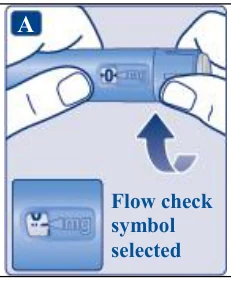  | ||
| B 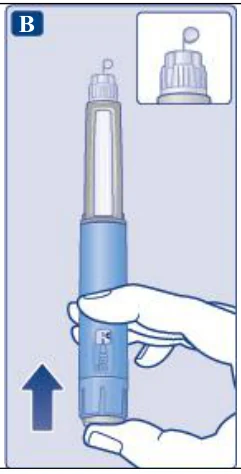 | ||
A small drop may remain at the needle tip, but it will not be injected. If no drop appears, repeat step 2 ‘Check the flow with each new pen’ up to 6 times. If there is still no drop, change the needle and repeat step 2 ‘Check the flow with each new pen’ once more. Dispose of the pen and use a new one if a drop of solution still does not appear. | |||
Always make sure that a drop appears at the needle tip before you use a new pen for the first time. This makes sure that the solution flows. If no drop appears, you will not inject any medicine even though the dose counter may move. This may indicate a blocked or damaged needle. If you do not check the flow before your first injection with each new pen, you may not get the prescribed dose and the intended effect of PLOSBRIO™. | |||
| |||
| A Example 0.25 mg selected 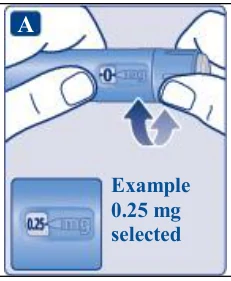  | ||
The dose selector changes the dose. Only the dose counter and dose pointer will show how many mg you select per dose. You can select up to 0.5 mg per dose. When your pen contains less than 0.5 mg, the dose counter stops before 0.5 is shown. The dose selector clicks differently when turned forwards, backwards or past the number of mg left. Do not count the pen clicks. | |||
Always use the dose counter and the dose pointer to see how many mg you have selected before injecting this medicine. Do not count the pen clicks. Only doses of 0.25 mg or 0.5 mg must be selected with the dose selector. The selected dose must line up precisely with the dose pointer to ensure that you get a correct dose. | |||
| How much solution is left | |||
| A Example Dose counter stopped: 0.25 mg left 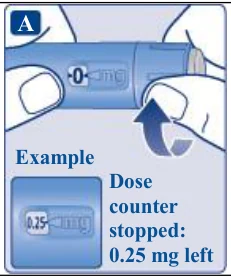  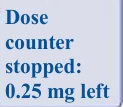 | ||
| If there is not enough solution left in your pen for a full dose, do not use it. Use a new PLOSBRIO™ pen. | |||
| |||
| A 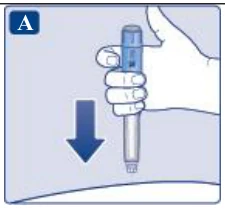 | ||
| B 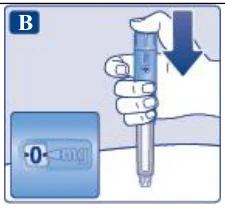 | ||
| C 1-2-3-4-5-6 Count slowly: 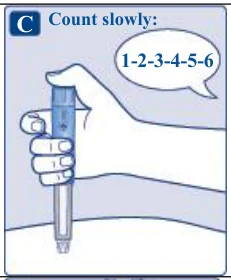  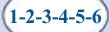 | ||
| D 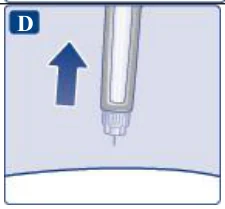 | ||
| You may see a drop of solution at the needle tip after injecting. This is normal and does not affect your dose. | |||
Always watch the dose counter to know how many mg you inject. Hold the dose button down until the dose counter shows 0. How to identify a blocked or damaged needle
| |||
| Never touch the dose counter when you inject. This can interrupt the injection. | |||
| |||
Always dispose of the needle after each injection to ensure convenient injections and prevent blocked needles. If the needle is blocked, you will not inject any medicine. Unscrew the needle and dispose of it carefully as instructed by your doctor, nurse, pharmacist or local authorities. | |||
| A 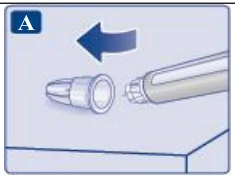 | ||
| B 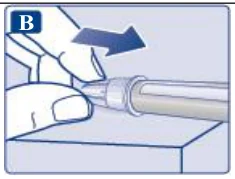 | ||
| C 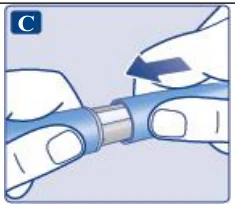 | ||
Always dispose of the needle after each injection to ensure convenient injections and prevent blocked needles. If the needle is blocked, you will not inject any medicine. When the pen is empty, throw it away without a needle on as instructed by your doctor, nurse, pharmacist or local authorities. | |||
Never try to put the inner needle cap back on the needle. You may stick yourself with the needle. Always remove the needle from your pen immediately after each injection. This may prevent blocked needles, contamination, infection, leakage of solution and inaccurate dosing. | |||
| Further important information | |||
| |||
| Caring for your pen | |||
| Treat your pen with care. Rough handling or misuse may cause inaccurate dosing, which may lead to high blood sugar levels or abdominal discomfort such as nausea or vomiting. | |||
| |||
| |||
Instructions on how to use PLOSBRIO™ solution for injection in pre-filled pen 0.25 mg or 0.5 mg doses (8-week pen) | |||
|---|---|---|---|
Please read these instructions carefully before using your PLOSBRIO™ pre-filled pen. Talk to your doctor, nurse or pharmacist about how to inject PLOSBRIO™ correctly. Start by checking your pen to make sure that it contains PLOSBRIO™ 0.25 mg or 0.5 mg doses, then look at the illustrations below to get to know the different parts of your pen and needle. If you are blind or have poor eyesight and cannot read the dose counter on the pen, do not use this pen without help. Get help from a person with good eyesight who is trained to use the PLOSBRIO™ pre-filled pen. Your pen is a pre-filled dial-a-dose pen. It contains 4 mg of semaglutide, and you can select doses of 0.25 mg or 0.5 mg. One unused pen contains:
Your pen is designed to be used with NovoFine® disposable needles up to a length of 8 mm. Disposable needles are included in the pack. | PLOSBRIO™ pre-filled pen and needle (example) Pen cap Outer needle cap Inner needle cap Needle Paper tab Pen window Pen label Dose counter Dose pointer Dose selector Dose button Flow check symbol P L O S B R I O | ||
Important information Pay special attention to these notes, as they are important for safe use of the pen. | |||
| |||
| A 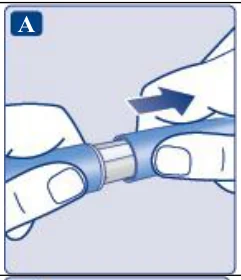 | ||
| B 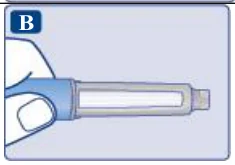 | ||
| C 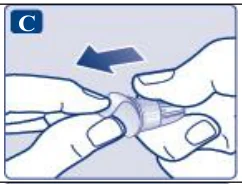 | ||
Make sure to attach the needle correctly.
| D 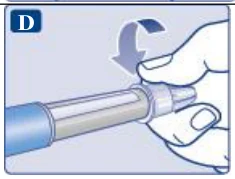 | ||
The needle is covered by two caps. You must remove both caps. If you forget to remove both caps, you will not inject any solution.
| E | ||
A drop of solution may appear at the needle tip. This is normal, but you must still check the flow, if you use a new pen for the first time. Do not attach a new needle to your pen until you are ready to take your injection. | F 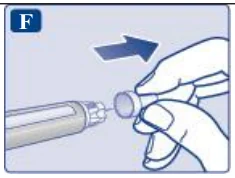 | ||
Always use a new needle for each injection. This may prevent blocked needles, contamination, infection and inaccurate dosing. | |||
| Never use a bent or damaged needle. | |||
| |||
 | A Flow check symbol selected 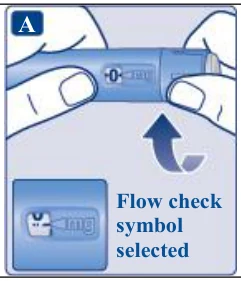  | ||
| B | ||
A small drop may remain at the needle tip, but it will not be injected. If no drop appears, repeat step 2 ‘Check the flow with each new pen’ up to 6 times. If there is still no drop, change the needle and repeat step 2 ‘Check the flow with each new pen’ once more. Dispose of the pen and use a new one if a drop of solution still does not appear. | |||
Always make sure that a drop appears at the needle tip before you use a new pen for the first time. This makes sure that the solution flows. If no drop appears, you will not inject any medicine even though the dose counter may move. This may indicate a blocked or damaged needle. If you do not check the flow before your first injection with each new pen, you may not get the prescribed dose and the intended effect of PLOSBRIO™. | |||
| |||
| A Example 0.25 mg selected 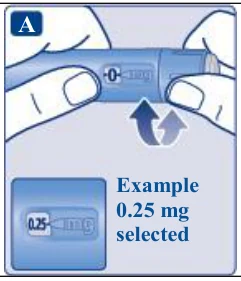 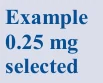 | ||
The dose selector changes the dose. Only the dose counter and dose pointer will show how many mg you select per dose. You can select up to 0.5 mg per dose. When your pen contains less than 0.5 mg, the dose counter stops before 0.5 is shown. The dose selector clicks differently when turned forwards, backwards or past the number of mg left. Do not count the pen clicks. | |||
Always use the dose counter and the dose pointer to see how many mg you have selected before injecting this medicine. Do not count the pen clicks. Only doses of 0.25 mg or 0.5 mg must be selected with the dose selector. The selected dose must line up precisely with the dose pointer to ensure that you get a correct dose. | |||
| How much solution is left | |||
| A Example Dose counter stopped: 0.25 mg left 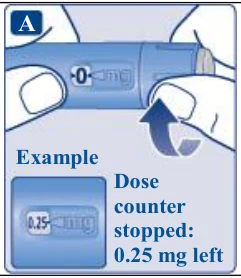  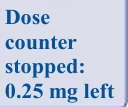 | ||
| If there is not enough solution left in your pen for a full dose, do not use it. Use a new PLOSBRIO™ pen. | |||
| |||
| A 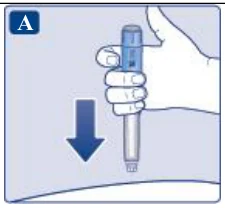 | ||
| B 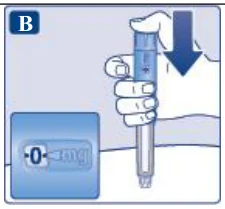 | ||
| C 1-2-3-4-5-6 Count slowly: 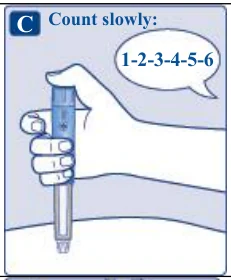   | ||
| D 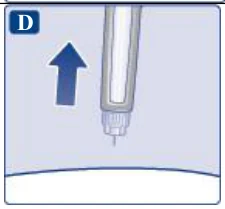 | ||
| You may see a drop of solution at the needle tip after injecting. This is normal and does not affect your dose. | |||
Always watch the dose counter to know how many mg you inject. Hold the dose button down until the dose counter shows 0. How to identify a blocked or damaged needle
| |||
| Never touch the dose counter when you inject. This can interrupt the injection. | |||
| |||
Always dispose of the needle after each injection to ensure convenient injections and prevent blocked needles. If the needle is blocked, you will not inject any medicine. Unscrew the needle and dispose of it carefully as instructed by your doctor, nurse, pharmacist or local authorities. | |||
| A | ||
| B | ||
| C 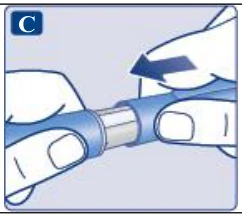 | ||
Always dispose of the needle after each injection to ensure convenient injections and prevent blocked needles. If the needle is blocked, you will not inject any medicine. When the pen is empty, throw it away without a needle on as instructed by your doctor, nurse, pharmacist or local authorities. | |||
Never try to put the inner needle cap back on the needle. You may stick yourself with the needle. Always remove the needle from your pen immediately after each injection. This may prevent blocked needles, contamination, infection, leakage of solution and inaccurate dosing. | |||
| Further important information | |||
| |||
| Caring for your pen | |||
| Treat your pen with care. Rough handling or misuse may cause inaccurate dosing, which may lead to high blood sugar levels or abdominal discomfort such as nausea or vomiting. | |||
| |||
| |||
Instructions on how to use PLOSBRIO™ solution for injection in pre-filled pen 1 mg doses | |||
|---|---|---|---|
Please read these instructions carefully before using your PLOSBRIO™ pre-filled pen. Talk to your doctor, nurse or pharmacist about how to inject PLOSBRIO™ correctly. Start by checking your pen to make sure that it contains PLOSBRIO™ 1 mg, then look at the illustrations below to get to know the different parts of your pen and needle. If you are blind or have poor eyesight and cannot read the dose counter on the pen, do not use this pen without help. Get help from a person with good eyesight who is trained to use the PLOSBRIO™ pre-filled pen. Your pen is a pre-filled dial-a-dose pen. It contains 4 mg of semaglutide, and you can only select doses of 1 mg. Your pen is designed to be used with NovoFine® disposable needles up to a length of 8 mm. Disposable needles are included in the pack. | PLOSBRIO™ pre-filled pen and needle (example) Pen cap Outer needle cap Inner needle cap Needle Paper tab Pen window Pen label Dose counter Dose pointer Dose selector Dose button Flow check symbol P L O S B R I O | ||
Important information Pay special attention to these notes, as they are important for safe use of the pen. | |||
| |||
| A 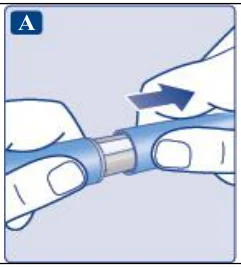 | ||
| B 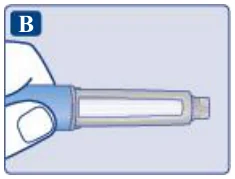 | ||
| C 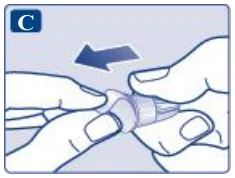 | ||
Make sure to attach the needle correctly.
| D 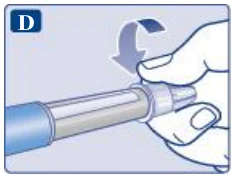 | ||
The needle is covered by two caps. You must remove both caps. If you forget to remove both caps, you will not inject any solution.
| E 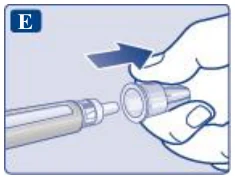 | ||
A drop of solution may appear at the needle tip. This is normal, but you must still check the flow if you use a new pen for the first time. Do not attach a new needle to your pen until you are ready to take your injection. | F 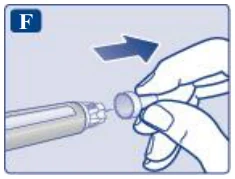 | ||
Always use a new needle for each injection. This may prevent blocked needles, contamination, infection and inaccurate dosing. | |||
| Never use a bent or damaged needle. | |||
| |||
 | A Flow check symbol selected 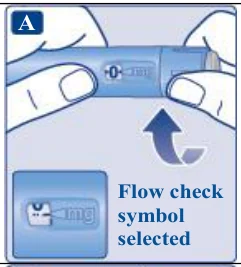  | ||
| B 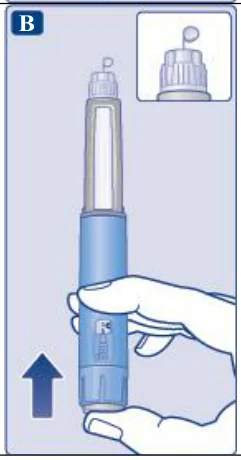 | ||
A small drop may remain at the needle tip, but it will not be injected. If no drop appears, repeat step 2 ‘Check the flow with each new pen’ up to 6 times. If there is still no drop, change the needle and repeat step 2 ‘Check the flow’ once more with each new pen. Dispose of the pen and use a new one if a drop still does not appear. | |||
Always make sure that a drop appears at the needle tip before you use a new pen for the first time. This makes sure that the solution flows. If no drop appears, you will not inject any medicine, even though the dose counter may move. This may indicate a blocked or damaged needle. If you do not check the flow before your first injection with each new pen, you may not get the prescribed dose and the intended effect of PLOSBRIO™ | |||
| |||
| 1 mg selected A 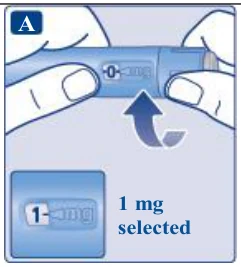  | ||
Only the dose counter and dose pointer will show that 1 mg has been selected. You can only select 1 mg per dose. When your pen contains less than 1 mg, the dose counter stops before 1 is shown. The dose selector clicks differently when turned forwards, backwards or past 1 mg. Do not count the pen clicks. | |||
Always use the dose counter and the dose pointer to see that 1 mg has been selected before injecting this medicine. Do not count the pen clicks. Only doses of 1 mg must be selected with the dose selector. 1 mg must line up precisely with the dose pointer to ensure that you get a correct dose. | |||
| How much solution is left | |||
| A Dose counter stopped: 1 mg left 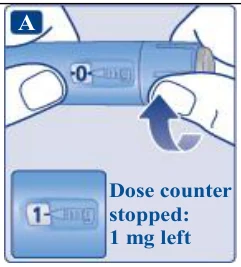 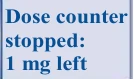 | ||
| If there is not enough solution left in your pen for a full dose, do not use it. Use a new PLOSBRIO™ pen. | |||
| |||
| A 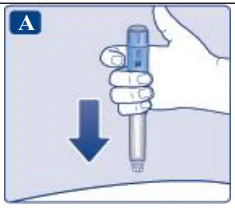 | ||
| B 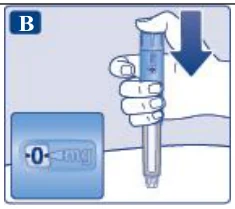 | ||
| C 1-2-3-4-5-6 Count slowly: 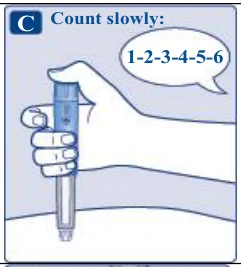  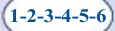 | ||
| D 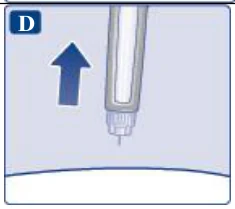 | ||
| You may see a drop of solution at the needle tip after injecting. This is normal and does not affect your dose. | |||
Always watch the dose counter to know how many mg you inject. Hold the dose button down until the dose counter shows 0. How to identify a blocked or damaged needle
How to handle a blocked needle Change the needle as described in step 5 ‘After your injection’ and repeat all steps starting with step 1 ‘Prepare your pen with a new needle’. Make sure you select the full dose you need. | |||
| Never touch the dose counter when you inject. This can interrupt the injection. | |||
| |||
Always dispose of the needle after each injection to ensure convenient injections and prevent blocked needles. If the needle is blocked, you will not inject any medicine. Unscrew the needle and dispose of it carefully as instructed by your doctor, nurse, pharmacist or local authorities. | |||
| A 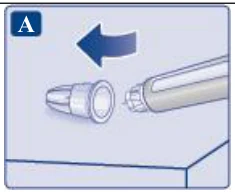 | ||
| B 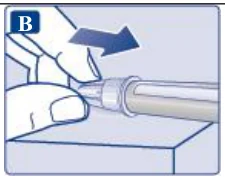 | ||
| C 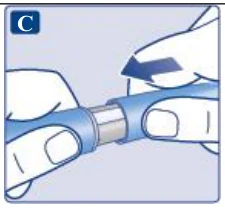 | ||
Always dispose of the needle after each injection to ensure convenient injections and prevent blocked needles. If the needle is blocked, you will not inject any medicine. When the pen is empty, throw it away without a needle on as instructed by your doctor, nurse, pharmacist or local authorities. | |||
Never try to put the inner needle cap back on the needle. You may stick yourself with the needle. Always remove the needle from your pen immediately after each injection. This may prevent blocked needles, contamination, infection, leakage of solution and inaccurate dosing. | |||
| Further important information | |||
| |||
| Caring for your pen | |||
| Treat your pen with care. Rough handling or misuse may cause inaccurate dosing, which may lead to high blood sugar levels or abdominal discomfort such as nausea or vomiting. | |||
| |||
| |||
Instructions on how to use PLOSBRIO™ solution for injection in pre-filled pen 1 mg doses (8-week pen) | |||
|---|---|---|---|
Please read these instructions carefully before using your PLOSBRIO™ pre-filled pen. Talk to your doctor, nurse or pharmacist about how to inject PLOSBRIO™ correctly. Start by checking your pen to make sure that it contains PLOSBRIO™ 1 mg, then look at the illustrations below to get to know the different parts of your pen and needle. If you are blind or have poor eyesight and cannot read the dose counter on the pen, do not use this pen without help. Get help from a person with good eyesight who is trained to use the PLOSBRIO™ pre-filled pen. Your pen is a pre-filled dial-a-dose pen. It contains 8 mg of semaglutide, and you can only select doses of 1 mg. Your pen is designed to be used with NovoFine® disposable needles up to a length of 8 mm. Disposable needles are included in the pack. | PLOSBRIO™ pre-filled pen and needle (example) Pen cap Outer needle cap Inner needle cap Needle Paper tab Pen window Pen label Dose counter Dose pointer Dose selector Dose button Flow check symbol P L O S B R I O 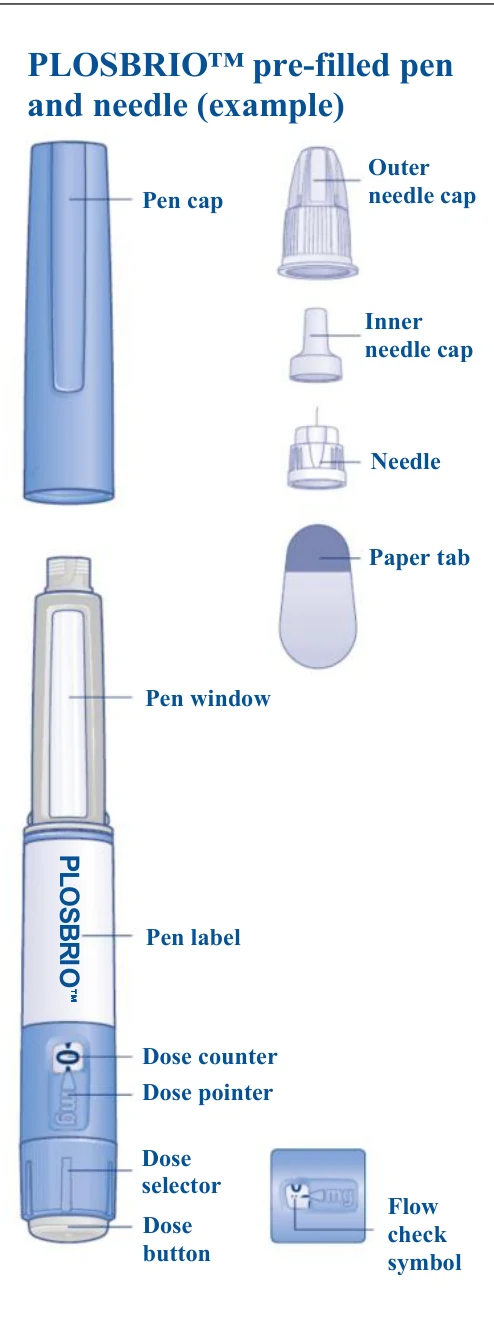  | ||
Important information Pay special attention to these notes, as they are important for safe use of the pen. | |||
| |||
| A 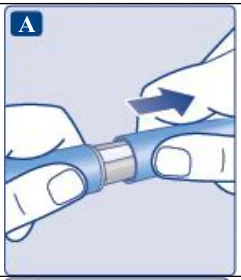 | ||
| B 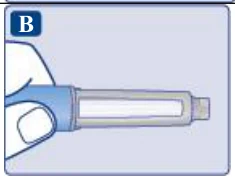 | ||
| C 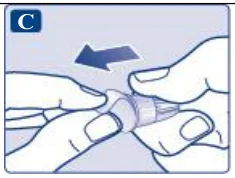 | ||
Make sure to attach the needle correctly.
| D 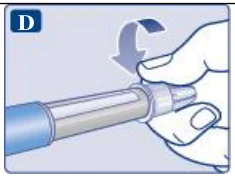 | ||
The needle is covered by two caps. You must remove both caps. If you forget to remove both caps, you will not inject any solution.
| E 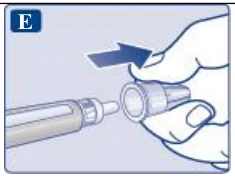 | ||
A drop of solution may appear at the needle tip. This is normal, but you must still check the flow, if you use a new pen for the first time. Do not attach a new needle to your pen until you are ready to take your injection. | F 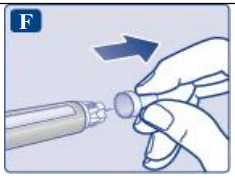 | ||
Always use a new needle for each injection. This may prevent blocked needles, contamination, infection and inaccurate dosing. | |||
| Never use a bent or damaged needle. | |||
| |||
 | A Flow check symbol selected 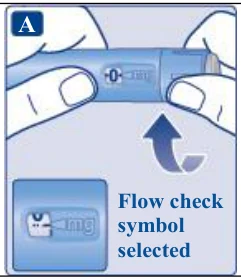  | ||
| B 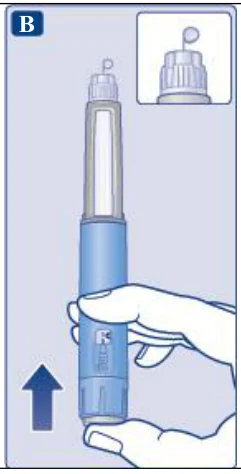 | ||
A small drop may remain at the needle tip, but it will not be injected. If no drop appears, repeat step 2 ‘Check the flow with each new pen’ up to 6 times. If there is still no drop, change the needle and repeat step 2 ‘Check the flow’ once more with each new pen. Dispose of the pen and use a new one if a drop still does not appear. | |||
Always make sure that a drop appears at the needle tip before you use a new pen for the first time. This makes sure that the solution flows. If no drop appears, you will not inject any medicine, even though the dose counter may move. This may indicate a blocked or damaged needle. If you do not check the flow before your first injection with each new pen, you may not get the prescribed dose and the intended effect of PLOSBRIO™. | |||
| |||
| 1 mg selected A 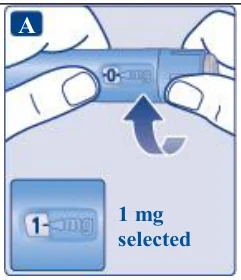  | ||
Only the dose counter and dose pointer will show that 1 mg has been selected. You can only select 1 mg per dose. When your pen contains less than 1 mg, the dose counter stops before 1 is shown. The dose selector clicks differently when turned forwards, backwards or past 1 mg. Do not count the pen clicks. | |||
Always use the dose counter and the dose pointer to see that 1 mg has been selected before injecting this medicine. Do not count the pen clicks. Only doses of 1 mg must be selected with the dose selector. 1 mg must line up precisely with the dose pointer to ensure that you get a correct dose. | |||
| How much solution is left | |||
| A Dose counter stopped: 1 mg left 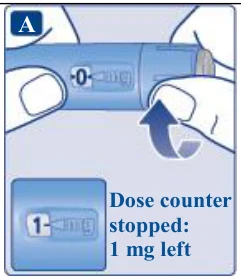 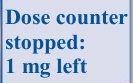 | ||
| If there is not enough solution left in your pen for a full dose, do not use it. Use a new PLOSBRIO™ pen. | |||
| |||
| A | ||
| B | ||
| C 1-2-3-4-5-6 Count slowly: 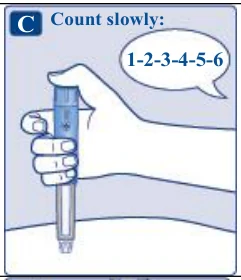   | ||
| D 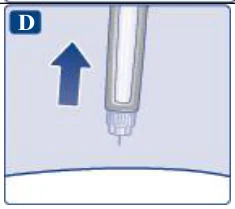 | ||
| You may see a drop of solution at the needle tip after injecting. This is normal and does not affect your dose. | |||
Always watch the dose counter to know how many mg you inject. Hold the dose button down until the dose counter shows 0. How to identify a blocked or damaged needle
How to handle a blocked needle Change the needle as described in step 5 ‘After your injection’ and repeat all steps starting with | |||
step 1 ‘Prepare your pen with a new needle’. Make sure you select the full dose you need. Never touch the dose counter when you inject. This can interrupt the injection. | |||
| |||
Always dispose of the needle after each injection to ensure convenient injections and prevent blocked needles. If the needle is blocked, you will not inject any medicine. Unscrew the needle and dispose of it carefully as instructed by your doctor, nurse, pharmacist or local authorities. | |||
| A 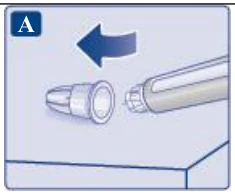 | ||
| B 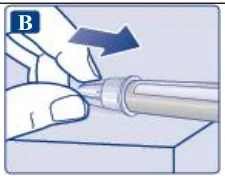 | ||
| C 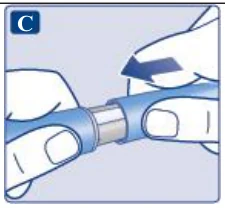 | ||
Always dispose of the needle after each injection to ensure convenient injections and prevent blocked needles. If the needle is blocked, you will not inject any medicine. When the pen is empty, throw it away without a needle on as instructed by your doctor, nurse, pharmacist or local authorities. | |||
Never try to put the inner needle cap back on the needle. You may stick yourself with the needle. Always remove the needle from your pen immediately after each injection. This may prevent blocked needles, contamination, infection, leakage of solution and inaccurate dosing. | |||
| Further important information | |||
| |||
| Caring for your pen | |||
| Treat your pen with care. Rough handling or misuse may cause inaccurate dosing, which may lead to high blood sugar levels or abdominal discomfort such as nausea or vomiting. | |||
| |||
a new needle and check the flow before you inject.
| |||
Instructions on how to use PLOSBRIO™ solution for injection in pre-filled pen 2 mg doses | |||
|---|---|---|---|
Please read these instructions carefully before using your PLOSBRIO™ pre-filled pen. Talk to your doctor, nurse or pharmacist about how to inject PLOSBRIO™ correctly. Start by checking your pen to make sure that it contains PLOSBRIO™ 2 mg, then look at the illustrations below to get to know the different parts of your pen and needle. If you are blind or have poor eyesight and cannot read the dose counter on the pen, do not use this pen without help. Get help from a person with good eyesight who is trained to use the PLOSBRIO™ pre-filled pen. Your pen is a pre-filled dial-a-dose pen. It contains 8 mg of semaglutide, and you can only select doses of 2 mg. Your pen is designed to be used with NovoFine® disposable needles up to a length of 8 mm. Disposable needles are included in the pack. | PLOSBRIO™ pre-filled pen and needle (example) Pen cap Outer needle cap Inner needle cap Needle Paper tab Pen window Pen label Dose counter Dose pointer Dose selector Dose button Flow check symbol P L O S B R I O | ||
Important information Pay special attention to these notes, as they are important for safe use of the pen. | |||
| |||
| A 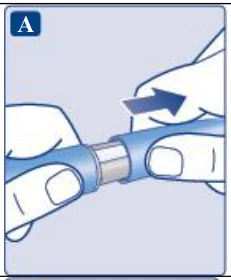 | ||
| B 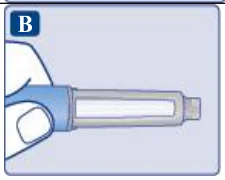 | ||
| C 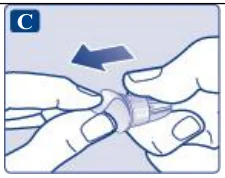 | ||
Make sure to attach the needle correctly.
| D 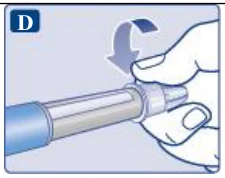 | ||
The needle is covered by two caps. You must remove both caps. If you forget to remove both caps, you will not inject any solution.
| E 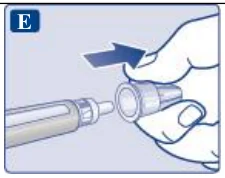 | ||
A drop of solution may appear at the needle tip. This is normal, but you must still check the flow, if you use a new pen for the first time. Do not attach a new needle to your pen until you are ready to take your injection. | F 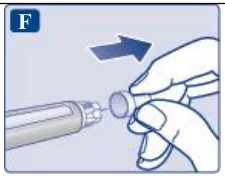 | ||
Always use a new needle for each injection. This may prevent blocked needles, contamination, infection and inaccurate dosing. | |||
| Never use a bent or damaged needle. | |||
| |||
| A Flow check symbol selected 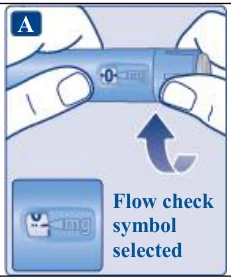  | ||
| B 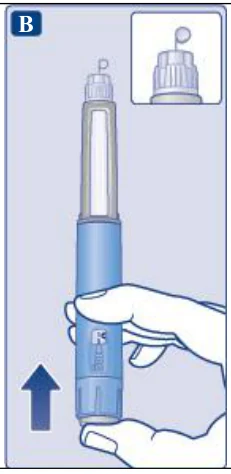 | ||
A small drop may remain at the needle tip, but it will not be injected. If no drop appears, repeat step 2 ‘Check the flow with each new pen’ up to 6 times. If there is still no drop, change the needle and repeat step 2 ‘Check the flow with each new pen’ once more. Dispose of the pen and use a new one if a drop of solution still does not appear. | |||
Always make sure that a drop appears at the needle tip before you use a new pen for the first time. This makes sure that the solution flows. If no drop appears, you will not inject any medicine, even though the dose counter may move. This may indicate a blocked or damaged needle. If you do not check the flow before your first injection with each new pen, you may not get the prescribed dose and the intended effect of PLOSBRIO™. | |||
| |||
| 2 mg selected A 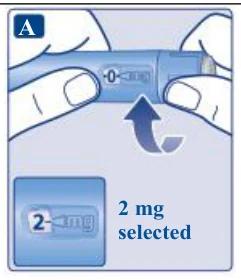 | ||
Only the dose counter and dose pointer will show that 2 mg has been selected. You can only select 2 mg per dose. When your pen contains less than 2 mg, the dose counter stops before 2 is shown. The dose selector clicks differently when turned forwards, backwards or past 2 mg. Do not count the pen clicks. | |||
Always use the dose counter and the dose pointer to see that 2 mg has been selected before injecting this medicine. Do not count the pen clicks. Only doses of 2 mg must be selected with the dose selector. 2 mg must line up precisely with the dose pointer to ensure that you get a correct dose. | |||
| How much solution is left | |||
| A Dose counter stopped: 2 mg left 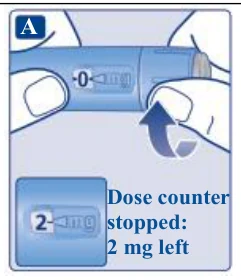 | ||
| If there is not enough solution left in your pen for a full dose, do not use it. Use a new PLOSBRIO™ pen. | |||
| |||
| A 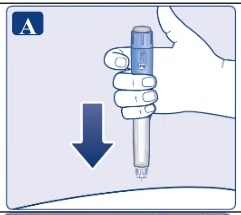 | ||
| B 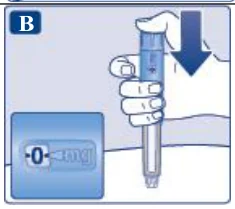 | ||
| C 1-2-3-4-5-6 Count slowly: 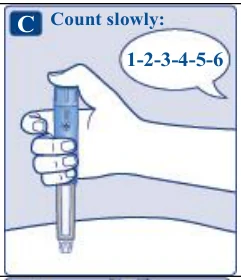 | ||
| D 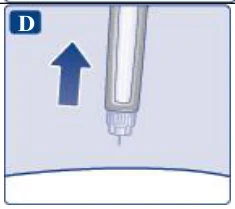 | ||
| You may see a drop of solution at the needle tip after injecting. This is normal and does not affect your dose. | |||
Always watch the dose counter to know how many mg you inject. Hold the dose button down until the dose counter shows 0. How to identify a blocked or damaged needle
How to handle a blocked needle Change the needle as described in step 5 ‘After your injection’ and repeat all steps starting with | |||
step 1 ‘Prepare your pen with a new needle’. Make sure you select the full dose you need. Never touch the dose counter when you inject. This can interrupt the injection. | |||
| |||
Always dispose of the needle after each injection to ensure convenient injections and prevent blocked needles. If the needle is blocked, you will not inject any medicine. Unscrew the needle and dispose of it carefully as instructed by your doctor, nurse, pharmacist or local authorities. | |||
| A 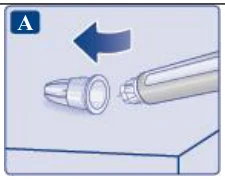 | ||
| B 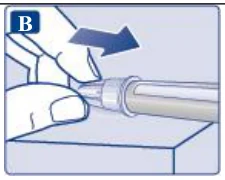 | ||
| C 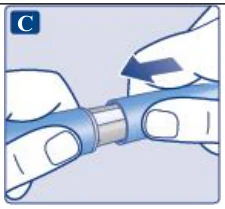 | ||
Always dispose of the needle after each injection to ensure convenient injections and prevent blocked needles. If the needle is blocked, you will not inject any medicine. When the pen is empty, throw it away without a needle on as instructed by your doctor, nurse, pharmacist or local authorities. | |||
Never try to put the inner needle cap back on the needle. You may stick yourself with the needle. Always remove the needle from your pen immediately after each injection. This may prevent blocked needles, contamination, infection, leakage of solution and inaccurate dosing. | |||
| Further important information | |||
| |||
| Caring for your pen | |||
| Treat your pen with care. Rough handling or misuse may cause inaccurate dosing, which may lead to high blood sugar levels or abdominal discomfort such as nausea or vomiting. | |||
| |||
a new needle and check the flow before you inject.
| |||